Find the right budget PC controller that matches your gaming setup. This guide highlights affordable options with solid build quality, latency-friendly features, and compatibility across PC, Android, and other devices. Whether you want hall-effect sticks for drift resistance or simple wired reliability, these picks aim to maximize value. The table below summarizes each top pick to help you compare at a glance.
| Product | Platform Compatibility | Key Benefit |
|---|---|---|
| 8Bitdo Ultimate 2C (Green) | Windows, Android | High polling rate, hall-effect sticks |
| GameSir Nova Lite 2 | PC, Switch, Android, iOS | Versatile wireless options, anti-drift sticks |
| Xbox Wireless Controller (Carbon Black) | PC, Xbox, Android, iOS | Modern comfort, reliable connectivity |
| Logitech G F310 | PC | Direct wired reliability, familiar layout |
| 8Bitdo Ultimate 2 (Black) | PC, Apple, Steam, Android | 8Speed wireless tech, versatile use |
8Bitdo Ultimate 2C Wireless Controller — Green

The 8Bitdo Ultimate 2C Green is designed for Windows and Android users seeking precise input without a high price. It features a 1000Hz polling rate for 2.4G and wired connections, plus Hall Effect joysticks and triggers to reduce drift. Wear-resistant metal joystick rings help extend life in regular play. This model is best for gamers who value long-term reliability and responsive control on a budget. A potential limitation is that some advanced features may require setup tweaks on certain devices.
GameSir Nova Lite 2 Wireless PC Controller

The GameSir Nova Lite 2 targets gamers who want multi-platform versatility and strong anti-drift performance. It supports Switch, PC, Android, and iOS through Bluetooth, wired, or wireless dongle connections. Hall Effect sticks and anti-friction rings offer smooth recentering and reduced drift. A two-way trigger lock enables quick changes between short and long pull positions, with hair-trigger mode for precise shots. Choose this if you need broad compatibility in a single device and innovative trigger options.
Xbox Wireless Controller — Carbon Black
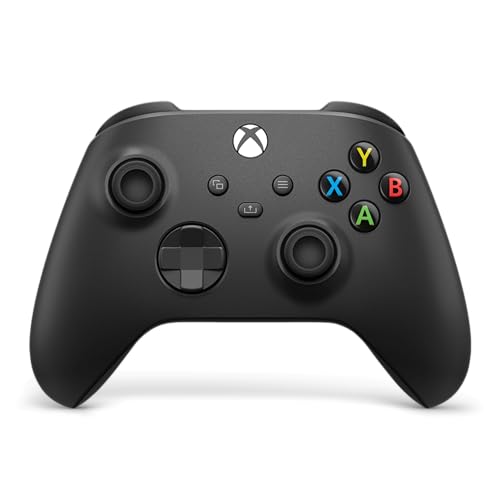
This controller emphasizes comfort and precision for long sessions. It features a modernized design with sculpted surfaces and textured grips on triggers and back case, which helps maintain control during gameplay. The hybrid D-pad and improved button layout support accurate inputs, while the Share button enables quick capture of gameplay moments. Best for gamers seeking a familiar layout with updated ergonomics, though some users prefer wired for zero-latency play.
Logitech G F310 Wired Gamepad

The Logitech G F310 offers reliable wired performance with broad game support. It uses familiar Xbox-style button layout and includes profiling software for mapping gamepad inputs to keyboard and mouse commands where supported. This model is best for players who want a straightforward, no-frap setup wired controller without wireless concerns. A limitation is the absence of wireless connectivity and modern wireless conveniences found in newer models.
8Bitdo Ultimate 2 Wireless Controller — Black

The 8Bitdo Ultimate 2 Wireless Controller (Black) focuses on strong wireless reliability and broad device support, including PC, Apple, Steam, and Android. Features like TMR Joysticks provide higher sensitivity and precision, and 8BitDo’s exclusive “8Speed” technology helps maintain a stable 2.4G connection with low latency. This option suits multi-platform players who value a versatile and consistent wireless experience. Better for multi-device players than a single-platform-only controller.
Buying Guide
What matters most to budget controller buyers?
Compatibility with your devices, input latency, and build quality are essential. Look for models with wired and wireless options, low drift, and durable joysticks. Hall Effect sticks are a plus for drift reduction.
Do you need cordless freedom or wired simplicity?
Wireless controllers offer freedom for couch gaming or travel, but wired connections provide consistent latency and battery reliability. If you play competitively in tight windows, consider models with reliable wired modes or ultra-low latency wireless tech.
Which features justify a higher budget within budget controllers?
Hall Effect joysticks, high polling rates (like 1000Hz), remappable buttons, and trigger stops add precision and customization. These features can significantly improve control feel without a large price jump.
What is the best choice for multi-platform use?
Controllers marketed for PC, Android, and other platforms (often with Bluetooth and 2.4G options) provide the most flexibility. Expect some setup variation across devices and apps.
How important is ergonomics and comfort?
Textured grips, contoured shapes, and button spacing influence fatigue. Test grip feel when possible, or choose models with proven ergonomic designs.
FAQ
- Are Hall Effect sticks worth it on a budget controller? Yes, they reduce drift and offer longer life, often without a steep price increase.
- Should I prioritize wired or wireless? If latency is critical, wired generally provides the most consistent performance; otherwise, modern wireless standards are adequate for casual play.
- Can budget controllers work across PC, Android, and consoles? Many do via Bluetooth, 2.4G dongles, or cables, but check each device’s official compatibility list.
- Do budget controllers have customizable inputs? Some models offer remappable buttons and trigger modes, which helps tailor control schemes to your games.
- Is a newer model always better? Not always. Look for the features you need (drift resistance, latency, compatibility) rather than chasing brand-new releases.
- Do these controllers require software to function? Some may need software for profiling, especially on PC, while others work plug-and-play.