For affordable Micro-ATX builds, these cases balance airflow, compatibility, and style without breaking the bank. They’re best for budget-conscious gamers, compact desk setups, and first-time builders who need straightforward installation. The following selections emphasize good airflow, practical GPU length support, and easy cable management.
| Product | MBI | Best For |
|---|---|---|
| TGDGAMER MATX Micro ATX Case | High airflow, compact interior | Budget builds needing multiple fans |
| Okinos Aqua UNO Micro ATX Case | ARGB lighting, no radiator support | Air-cooled systems with stylish lighting |
| MOROVOL MATX PC Case | Panoramic tempered glass | Showcase builds on a budget |
| Zalman CUBIX-G Micro-ATX | Preinstalled FRGB fans, compact | Budget gaming desktops |
| JONSBO D32 STD Micro-ATX | Desktop-friendly, broad compatibility | Value-packed, versatile builds |
TGDGAMER MATX Micro ATX Case, High Airflow Slim PC Case

Best for budget builds that require strong airflow. This case supports mini ITX and mATX motherboards with a compact interior that fits up to two 120mm fans and one 80mm fan, plus radiators up to 135mm in height. It is ideal for users who want a budget-friendly, high-airflow solution with straightforward assembly.
Who it’s for: gamers and students building a compact system without buying premium cooling. Why selected: strong airflow options and flexible mounting for a budget price. Caution: radiator compatibility is limited to smaller radiators; plan cooling accordingly.
Okinos Aqua UNO Micro ATX Case

Best for air-cooled builds focused on simple maintenance and ARGB aesthetics. The UNO supports air cooling up to 165 mm in height and includes three 120mm ARGB fans pre-installed, enhancing airflow and lighting. Note that it does not support radiator installation and has limited room above the PSU shroud for extra fans.
Who it’s for: users prioritizing a clean, low-maintenance air-cooled setup with eye-catching lighting. Why selected: comes with three ARGB fans out of the box. Caution: no radiator support means water cooling is not an option.
MOROVOL MATX PC Case

Best for show-friendly builds on a budget. This MC-MATX case features a 270° panoramic tempered glass panel, providing an expansive view of components. It supports Micro-ATX motherboards and can host several cooling and GPU configurations, depending on internal space.
Who it’s for: builders seeking a bold look without a premium price. Why selected: the panoramic glass offers a striking display while staying economical. Caution: design flexibility depends on component height and thickness due to the glass panel layout.
Zalman CUBIX-G Micro-ATX MATX Compact
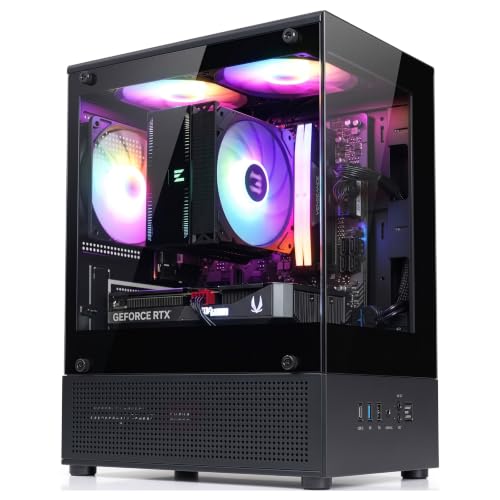
Best for compact, budget-conscious builds that still require effective cooling. The CUBIX-G uses a perforated front panel and an 80mm pre-installed fan to promote airflow. It supports GPUs up to 280mm and ATX power supplies up to 140mm, making it a flexible small form choice.
Who it’s for: users needing a compact gaming build with solid internal clearance. Why selected: balanced cooling and broad internal support in a small footprint. Caution: 80mm fan is older technology; consider additional airflow needs for hot components.
JONSBO D32 STD Micro-ATX PC Case

Best for value-focused builds with broad compatibility. The JONSBO D32 STD supports Micro-ATX motherboards and is compatible with a range of cooling options, including 240 AIO top mounts and various GPU lengths, making it flexible for different budgets.
Who it’s for: builders who want versatile hardware support at a low price. Why selected: cost-effective while maintaining practical compatibility. Caution: compact form factor may limit large custom cooling setups.
Buying Guide: Choosing the Right Budget MATX Case
- What size motherboard do you plan to use? Micro-ATX is supported broadly in these options; confirm any specific ITX or MATX preferences.
- How many fans and what cooling style do you want? If you prioritize air cooling, look for cases with multiple front/side fan mounts. If you plan on water cooling, check radiator clearance and top/bottom mounting options.
- GPU length and PSU availability matter. Verify the maximum GPU length and whether ATX PSUs fit inside your chosen chassis.
- Glass panels vs. plain panels: do you want a showpiece or a low-profile build? Panoramic tempered glass adds style but may impact mounting flexibility.
- Ease of assembly and cable management: look for cases with good cable routing space and accessible drive bays.
Frequently Asked Questions
- What is MATX and who should use it?
Micro-ATX is a smaller motherboard form factor; these cases target budget builds, compact desks, and easy-to-manage setups. - Can these cases fit full-size GPUs?
Most listed models support GPUs up to roughly 260-285mm, but always confirm the exact length for your chosen GPU. - Are ARGB fans worth it in budget cases?
ARGB fans provide lighting and airflow but may add cost; some cases include ARGB fans out of the box, which improves value. - Is radiatorsupport important in a budget MATX case?
It depends on your cooling plan. Some cases are air-cooled only, while others offer limited radiator mounting options. - What about tempered glass panels?
They improve aesthetics but require careful handling during assembly and cable routing to avoid interference. - Which case should I choose for a budget gaming setup?
For overall value and airflow, consider models with multiple fan mounts and GPU clearance, like TGDGAMER or Zalman variants.