Yes—these budget gaming TVs deliver solid 4K picture quality, fast motion handling, and gaming features without breaking the bank. They’re best for casual to mid-core gamers, console players, and PC gamers who want smooth 4K gameplay on a reasonable budget. The top picks balance price, performance, and features like high refresh rates, HDR formats, and gaming modes.
| Product | Screen | Key Tech | Best For |
|---|---|---|---|
| Hisense 43″ E6 Cinema Series (43E6QF) | 43″ | Hi-QLED Color, Dolby Vision, Dolby Atmos, Game Mode Plus | Compact setup, small living spaces, console gaming |
| Hisense 55″ U6 Pro Series Mini-LED (55U6SF Pro) | 55″ | Native 144Hz, Mini-LED, Hi-QLED, built-in subwoofer | Fast-action gaming, motion-heavy content |
| Hisense 55″ E6 Cinema Series (55E6QF) | 55″ | Hi-QLED Color, Dolby Vision, Dolby Atmos, Game Mode Plus | Mid-size rooms, film-friendly HDR gaming |
| TCL 55″ T7 4K QLED Google TV (55T7) | 55″ | 4K QLED, 120Hz panel, Google TV | Smart features with gaming |
| INSIGNIA 43″ F50 Series (43F50) | 43″ | 4K UHD, Fire TV, Alexa voice remote | Budget-friendly streaming + gaming |
Hisense 43″ E6 Cinema Series Budget Gaming TV

The Hisense 43″ E6QF delivers a compact 4K picture with Hi-QLED color and a Total HDR Solution that emphasizes ink-black blacks and brighter colors. It supports Dolby Vision and Dolby Atmos for cinema-like visuals and sound. Game Mode Plus optimizes responsiveness for console or PC gaming, making it a strong choice for small rooms or dorm setups. Best for players who want strong HDR imaging and immersive audio without a large screen footprint.
Best for: players with limited space who still want cinematic HDR and a responsive gaming experience. Limitation: smaller screen may not satisfy users seeking immersive large-room immersion.
Hisense 55″ U6 Pro Series Mini-LED Gaming TV

The 55″ U6 Pro uses Mini-LED backlighting with Hi-QLED color, delivering strong contrast and vivid colors. Its native 144Hz refresh rate and high motion performance reduce blur in fast action, making it well-suited for esports and fast-paced titles. Built-in subwoofer adds some depth to audio, which helps in gaming and movie watching. Best for: gamers who want a larger, bright panel with smooth motion; better for rooms with more ambient light. Caution: higher price relative to entry-level models may be a consideration.
Hisense 55″ E6 Cinema Series 4K HDR TV
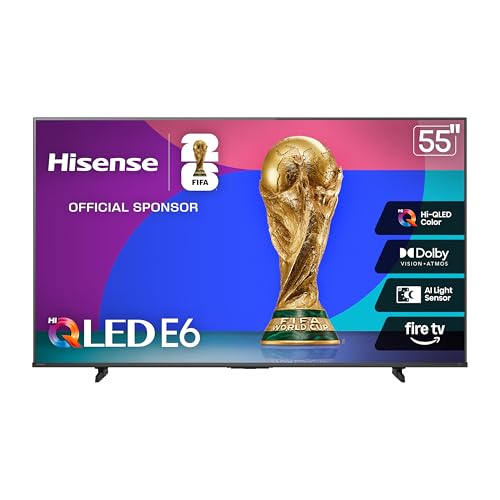
The 55E6QF mirrors the 43E6 with Hi-QLED Color and Dolby Vision Atmos. It’s designed for strong HDR image quality in a mid-sized living room. Game Mode Plus helps minimize input lag for a snappier gaming experience. Best for: general-purpose gaming and movie watching in larger spaces than the 43″ option. Caution: mid-sized panel may feel smaller for immersive cinematic gaming in large rooms.
TCL 55″ T7 4K QLED Google TV

The TCL T7 combines 4K resolution with QLED color and a 120Hz panel, providing smooth motion for gaming, movies, and sports. It runs Google TV, offering broad app compatibility and streaming options. Best for: buyers who want a budget-friendly Smart TV with strong gaming response and easy access to apps. Caution: Google TV interface may be more complex for casual users who prefer a simpler smart-TV experience.
INSIGNIA 43″ F50 Series LED 4K UHD Smart Fire TV

The Insignia F50 43″ offers 4K UHD with HDR10 and the Fire TV experience, including Alexa voice remote control. It provides a budget-friendly option for streaming and casual gaming, with straightforward navigation and a compact form factor. Best for: shoppers prioritizing an affordable Fire TV interface and simple setup. Caution: smaller screen size may limit immersion for some games or cinematic content.
Buying Guide
What to consider when choosing a budget gaming TV
- Screen size and room fit: Smaller rooms benefit from 43″–55″ panels, while larger spaces can justify 55″ or bigger for immersion.
- Refresh rate and motion handling: Look for 120Hz or higher where possible for smoother gameplay and reduced blur.
- HDR formats: Dolby Vision and HDR10+ provide better contrast and brightness. Check compatibility with your devices.
- Backlighting technology: Mini-LED or Hi-QLED generally offer better contrast and color than basic LED panels.
- Gaming features: Game Mode, low input lag, and compatibility with your console or PC GPU are key.
- Smart TV platform: Google TV, Fire TV, or built-in apps affect convenience and app availability.
- Sound: Built-in speakers and optional external audio can influence immersion; some models include subwoofers.
How to compare models quickly
- Compare native refresh rate, response time, and input lag specs when gaming.
- Assess HDR support (Dolby Vision, HDR10+, HDR10, HLG) and peak brightness.
- Evaluate size, stand design, and panel type for your setup.
- Consider smart features, voice control, and app ecosystems you already use.
Buying considerations by use case
- Casual gaming in small rooms: 43″ E6 or 43″ F50-series Insignia offer compact convenience and solid HDR.
- Mid-size room gaming with strong motion: 55″ U6 Pro or 55″ E6QF balance size and image quality.
- Smart streaming plus gaming on a budget: 55″ T7 or 43″ F50 provide good value with robust app support.
FAQ
- What size is best for a small gaming setup? A 43″ to 55″ panel often fits best in compact spaces, balancing pixel density and viewing distance.
- Do budget TVs support high refresh rates for gaming? Yes, several models offer 120Hz panels or equivalent gaming modes for smoother motion.
- Is HDR important on a budget TV? HDR improves contrast and color; look for models with Dolby Vision or HDR10+ where possible.
- Should I choose Mini-LED or traditional LED on a budget? Mini-LED generally provides better contrast, but price varies; Hi-QLED and local dimming help non-Mini-LED sets.
- Is a built-in sound system enough for gaming? Some models include built-in subwoofers, but you may still prefer a dedicated soundbar for larger rooms.
- What smart platform is easiest for beginners? Fire TV and Google TV offer broad app support and straightforward setups, depending on your preferred ecosystem.