The top budget gaming notebooks below balance price, CPU/GPU power, and display quality to satisfy entry-to-mid level gamers. These models are best for students, casual gamers, and budget-conscious users who still want playable frame rates at 1080p. Each option is chosen for reliability, thermals, and upgrade paths where available. This guide highlights five strong picks and explains who each is best for, plus practical buying considerations and common questions to help you decide.
| Product | CPU / GPU | RAM / Storage | Display | Why It Stands Out |
|---|---|---|---|---|
| HP Victus 15 (15-fa0025nr) | 12th Gen Intel Core i5-12500H · RTX 3050 | 8 GB · 512 GB SSD | Full HD | Solid all-around performance; cooler thermals for budget gaming |
| MOONFISH 2026 Laptop | 4425Y · Integrated options | 16 GB · 256 GB SSD | 15.6″ FHD IPS | Strong RAM for multitasking and everyday work |
| ASUS TUF Gaming F16 (2026) | Intel Core i5-210H · RTX 4050 | 8 GB · 512 GB SSD | FHD 144Hz | Modern GPU with high-refresh display for smoother gaming |
| acer Aspire 3 A315-24P-R7VH | Ryzen 3 7320U · Radeon Graphics | 8 GB · 128 GB SSD | 15.6″ FHD | Best value for light gaming and portability |
| msi Thin A15 | Ryzen 5-7535HS · RTX 3050 | 16 GB · 512 GB SSD | 15.6″ FHD 144Hz | Strong mid-range gaming performance in a slim form |
HP Victus 15 Gaming Laptop, 12th Gen i5 + RTX 3050
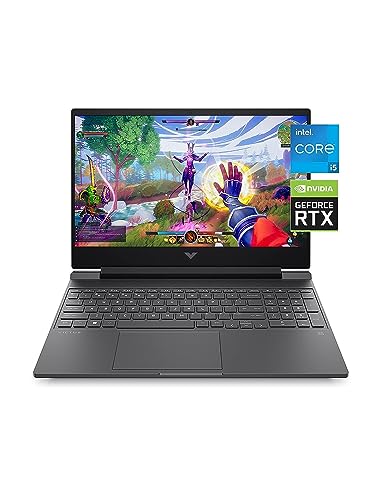
The HP Victus 15 with an RTX 3050 is best for budget-conscious gamers who want reliable 1080p performance and solid thermals in a backlit keyboard chassis. It pairs a capable 12th Gen Intel Core i5 processor with a modern GPU to handle AAA titles at med settings and esports titles at higher frames. Best for students or entry-level gamers who prioritize steady frame rates and Windows 11 integration for a clean, ready-to-go experience.
Who it’s best for: budget-focused buyers who want a reputable brand, decent cooling, and a familiar Windows environment. How it helps: strong multi-tasking with the latest Windows 11 features supports chat, streaming, and schoolwork alongside gaming. Caution: 8 GB RAM may limit multitasking; consider upgrading RAM for heavier multitasking or future-proofing.
MOONFISH 2026 Laptop with Windows 11 Pro

This MOONFISH model emphasizes multitasking with 16 GB RAM and a capable 4425Y processor, making it a good pick for students and professionals who want a dependable daily laptop that can handle light gaming, office work, and media consumption. Best for: buyers who prioritize memory for smoother app switching and a longer warranty window. Limitation: integrated or lower-capacity storage may limit game libraries or large file storage, so plan for external or internal upgrades if needed.
ASUS TUF Gaming F16 (2026)

The ASUS TUF F16 is a strong pick for gamers seeking a high-refresh 144Hz FHD display, a capable RTX 4050, and a modern chassis. It suits players who want smoother gameplay, reduced motion blur, and adaptive sync for competitive titles. Best for: gamers who want a reliable 2026-era laptop with a balance of price and performance. Caution: 8 GB RAM is workable, but upgrading to 16 GB will improve multitasking and future-proofing.
Acer Aspire 3 A315-24P-R7VH

The Acer Aspire 3 offers strong value with an AMD Ryzen 3 7320U and 128 GB SSD, designed for light gaming and everyday tasks. This choice is best for budget shoppers who prioritize portability, basic gaming capability, and a low total cost of ownership. Best for: students and casual users who mainly game at low to mid settings and need long battery life. Caution: limited storage may necessitate external drives or a higher-capacity model for large game libraries.
MSI Thin A15 Gaming Laptop

The MSI Thin A15 pairs a Ryzen 5-7535HS with RTX 3050 for solid 1080p gaming in a slim frame. It’s a good choice for gamers who want mobility without sacrificing gaming ability. Best for: gamers who travel or study and still want presentable, capable hardware. Caution: 16 GB RAM helps with multitasking, but the base 8 GB in some configurations may bottleneck heavier workloads until upgraded.
Alienware 16 Aurora Gaming Laptop

The Alienware 16 Aurora introduces a 16” display with a powerful RTX 5050 GPU, designed for immersive gaming and creative workloads. This option is best for buyers who want a premium-feeling chassis and cutting-edge graphics power in a budget-focused segment. Caution: Alienware models can be heavier and pricier than other budget picks, so consider portability and budget constraints before choosing.
HP Victus 15.6″ FHD 144Hz (2026)

This HP Victus 2026 model combines a 144Hz FHD display with RTX 4050 and 16 GB DDR4 RAM, delivering smoother visuals and better multitasking for a budget-friendly price. Best for: gamers who want a well-rounded system with modern GPU and memory. Limitation: the 16 GB RAM helps, but storage may feel modest for large game libraries if you plan to install many titles.
Buying Guide: Key Considerations For Budget Gaming Notebooks
- Graphics performance: For smooth 1080p gaming, a mobile RTX 3050/4050 or RTX 5050 is a solid baseline. Consider GPU memory and TBP (total GPU power) within your budget.
- CPU and multitasking: A recent-generation CPU improves game performance and everyday tasks. If you multitask or stream, favor models with at least 16 GB RAM or plan a RAM upgrade.
- Display: A higher refresh rate (120 Hz or 144 Hz) improves gaming fluidity, especially in fast-paced titles. IPS panels offer better color and viewing angles.
- Storage: 512 GB SSD is common in budget gaming notebooks; consider adding an external drive or upgrading to 1 TB to hold more titles and media.
- Thermals and build: Look for laptops with tested cooling designs and a chassis that stays comfortable during long sessions. Thicker displays and better fans help maintain performance under load.
- Upgradeability: RAM and storage upgrades extend the laptop’s useful life and gaming capability.
Frequently Asked Questions
- What makes a notebook a good budget gaming option? A balanced combination of a capable GPU, a recent CPU, adequate RAM, and a display that supports smooth refresh rates within a reasonable price.
- Is 8 GB RAM enough for modern gaming? For many games at medium settings, 8 GB can suffice, but 16 GB improves multitasking and future-proofing.
- Should I prioritize a higher refresh rate display? Yes, if you play fast action or competitive titles, a 144 Hz display provides smoother gameplay than 60 Hz.
- Do budget gaming laptops need external storage? Many do, especially if you install large game libraries. An external hard drive or SSD can expand capacity affordably.
- Are newer RTX GPUs worth it in budget laptops? Newer GPUs generally offer better efficiency and performance for 1080p gaming, but verify total power and cooling for sustained performance.
- Can I upgrade RAM or storage later? Most budget gaming laptops support RAM and storage upgrades, which can boost performance and extend the device’s life.