Looking for a reliable 43-inch TV that blends 4K picture quality with smart features without breaking the bank? This guide highlights five budget-friendly 43″ options ideal for first-time smart-TV buyers, cord-cutters, or anyone upgrading from older HDTVs. Each pick targets a different buyer type, from streaming enthusiasts to gaming-focused viewers. Read on to compare core features, ideal use cases, and practical considerations to help you decide.
| Product | Best For | Key Benefit |
|---|---|---|
| INSIGNIA 43″ F50 Series | Prime streaming fans | 4K HDR with Fire TV built-in |
| Roku Select Series 43″ | Simple setup lovers | Roku OS with easy navigation |
| TOSHIBA 43″ C350 Series | Alexa users + live TV | AI upscaling + Dolby Atmos |
| Samsung 43″ U8000H | Free content fans | Crystal Processor and TV Plus |
| Hisense 43″ E6 QLED | HDR detail seekers | Hi-QLED with Dolby Vision/Atmos |
Insignia 43-Inch F50 Series Fire TV

Best for: Fire TV fans who want one-stop streaming with voice control. This model combines 4K Ultra HD visuals with HDR10 and an integrated Fire TV experience, including access to Prime Video, Netflix, Disney+, Hulu, HBO Max, and more. The bundled Alexa voice remote makes quick searches and app launches fast. A practical pick for apartment dwellers or shared living spaces where cable subscriptions are not desired. Caution: content availability may vary by region and service subscriptions.
Roku 43-Inch Select Series 4K HDR

Best for: Viewers who want a simple, streamlined interface with broad app support. The Roku Select Series emphasizes fast setup, an uncluttered Home Screen, and easy navigation, making it ideal for households with mixed devices or younger viewers. It suits cord-cutters seeking a broad app catalog without complex tuning. Limitation: some advanced picture enhancements may be less aggressive than premium rivals.
TOSHIBA 43″ C350 Series Fire TV

Best for: Alexa-integration fans who want live TV options. The C350 series combines Fire TV with Toshiba’s REGZA Engine ZR and AI upscaling to improve Full HD content. Dolby Vision Atmos support enhances audio immersion. Choose this if you value upscaling and cinematic sound in a budget 4K setup. Caution: real-world HDR performance can vary with content.
Samsung 43-Inch Crystal UHD U8000H

Best for: Viewers who want free content options alongside vibrant 4K visuals. The Crystal Processor enhances color and detail, while Samsung TV Plus offers 2,700+ free channels and on-demand content. The Motion XcelERATOR helps with sports and fast-paced scenes. Limitation: some premium channels require subscriptions for full libraries.
Samsung 43-Inch M70H Mini LED Series

Best for: Viewers who want premium brightness and color with minimal blooming. The Mini LED processor delivers brighter highlights and deep blacks with a billion true-to-life colors. This model targets buyers who value higher contrast and HDR impact in a budget 43-inch package. Caution: Mini LED benefits are more noticeable with high-dynamic-range content and may exceed basic streaming needs for some viewers.
Amazon Ember 43″ 4-Series Fire TV

Best for: Those seeking a newer Fire TV experience with ambient features. Ember 4-Series delivers 4K Ultra HD with HDR10+. A fast processor and Wi-Fi 6 support support quick app launches and smooth streaming. This option is well-suited for streaming-heavy households that want a bright, responsive user experience. Caution: Availability and app selections may shift with platform updates.
Westinghouse 43-Inch Roku TV
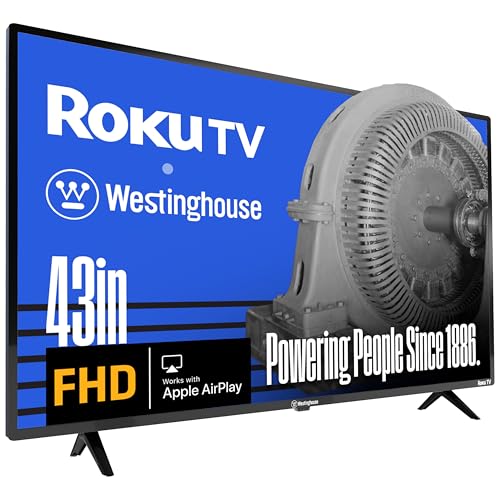
Best for: Budget-conscious shoppers who want broad streaming without extra device clutter. This Westinghouse Roku TV offers 1080p with a 43″ display and Roku’s streaming ecosystem, plus compatibility with voice assistants. It’s a solid pick for casual viewing or as a secondary TV in bedrooms or guest rooms. Limitation: image resolution is 1080p, not 4K, which may matter for terrace lighting or future-proofing.
Buying Guide
- Picture quality vs. budget: If you value HDR and richer colors, prioritize models with Dolby Vision or HDR10+ and a capable processor, such as Samsung’s Crystal or Mini LED options.
- Smart platform: Consider your ecosystem. Fire TV works well with Prime Video and Alexa; Roku offers broad app support and a simple interface; Samsung’s TV Plus provides free channels alongside apps.
- Upgrade path: If you plan to expand with soundbars or gaming, check for HDMI 2.1 features or low input lag specifications, especially on models marketed for gaming.
- Content needs: For routine streaming, a model with a robust app catalog and user-friendly navigation saves time. If live TV matters, look for built-in live TV or strong upscaling of broadcast content.
- Audio considerations: Many budget sets have respectable TV speakers, but Dolby Atmos support or external soundbars can significantly improve immersion.
FAQ
- What is the best 43-inch TV for streaming?
Answer: Models with robust smart platforms (like Fire TV or Roku) and strong HDR support are best for streaming-heavy use. - Do 4K TVs in this size require a lot of space?
Answer: A 43-inch screen fits most medium-sized living rooms and bedrooms, offering a balance between viewing distance and picture detail. - Is HDR worth it on a budget 43-inch TV?
Answer: Yes, HDR enhances brightness and color range, especially with HDR10 and Dolby Vision-capable models. - Should I choose 1080p or 4K at 43 inches?
Answer: For most users, 4K provides crisper details at common viewing distances; 1080p can still be adequate for casual watching. - Will built-in live TV save me money?
Answer: Built-in live channels on some models can reduce the need for extra streaming devices or subscriptions, depending on availability.