Answering the need for seamless, cable-free productivity, these Bluetooth keyboard and mouse combos cover multi-device setups, cross-OS compatibility, and comfortable typing with durable builds. Ideal buyers include students, hybrid workers, and home-office users who want quick pairing, reliable range, and spill-resistant designs. Below is a quick, at-a-glance guide to five top options and who they’re best for.
| Product | Brand | Best For |
|---|---|---|
| MK250 Bluetooth Keyboard and Mouse Combo (Graphite) | Logitech | Casual work and home use; Bluetooth pairing, long battery life |
| MK270 Full Size Wireless Keyboard and Mouse Combo | Logitech | Reliable 33 ft wireless range; full-size layout |
| COE200 Wireless Bluetooth Keyboard and Mouse Combo | seenda | Multi-device switching; cross-OS compatibility |
| MK250 Compact Wireless Bluetooth Keyboard and Mouse Combo (Rose) | Logitech | Space-saving setup with Bluetooth; stylish color |
| MK345 Full Size Wireless Keyboard and Mouse Combo | Logitech | Windows-centric workflow with familiar keys |
Logitech MK250 Wireless Bluetooth Keyboard and Mouse Combo – Graphite

The MK250 Graphite uses fast Bluetooth pairing to eliminate dongles and USB ports. It emphasizes durability with spill-resistant keys and a long-lasting battery life—up to 12 months for the keyboard. This model focuses on comfort via deep-profile keys and an adjustable tilt-leg design, making it suitable for general typing tasks, office work, and home computer use. Best for users who want straightforward Bluetooth connectivity without USB receivers and a simple, reliable setup.
Best for: Casual daily tasks and multi-hour typing sessions at a stable price point. Avoid if you need dedicated multimedia keys or a more premium, feature-rich keyboard.
Logitech MK270 Full Size Wireless Keyboard and Mouse Combo – Black

The MK270 pairs a full-size keyboard with a reliable 2.4 GHz USB receiver, offering up to 33 ft of wireless range. It’s designed for comfort with a low-profile keyboard and quiet keys, plus a dedicated number pad, F-keys, and arrow keys. The spill-resistant design adds durability for busy desks. It’s best for users who want a traditional layout with a straightforward plug-and-play setup across Windows and other systems via the USB receiver. Choose this if you value a tried-and-true wireless connection and a complete keyboard layout.
Best for: Desktop setups where a stable, no-fuss wireless connection is paramount. Better for those who want a USB receiver instead of Bluetooth pairing.
seenda COE200 Wireless Bluetooth Keyboard and Mouse Combo with Wrist Rest

The COE200 offers dual connectivity: Bluetooth 5.0 for Bluetooth devices and a 2.4G USB receiver for non-Bluetooth setups. It supports Windows, macOS, iPadOS, and Android, with a multi-device switching capability that helps users toggle between two devices efficiently. A key feature is the wrist rest, which improves ergonomics for long typing sessions. Best for hybrid users who blend Windows and Mac or who frequently switch between devices. Limitation: Bluetooth pairing can be dependent on OS compatibility and may require driver considerations on some devices.
Logitech MK250 Compact Wireless Bluetooth Keyboard and Mouse Combo – Rose
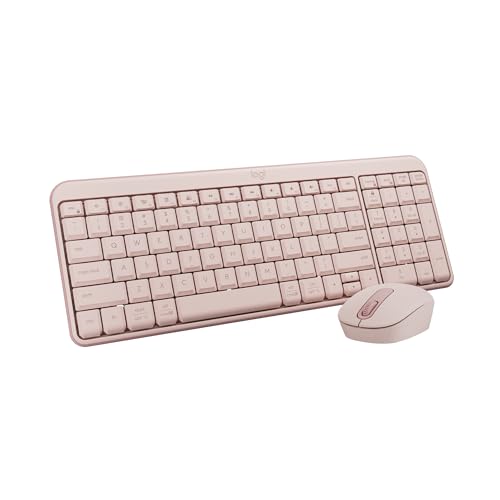
This MK250 Rose version mirrors the Graphite model with quick Bluetooth pairing, a spill-resistant keyboard, and a long 12-month keyboard battery life. Its compact form preserves desktop real estate while maintaining comfort through deep-profile keys and adjustable tilt legs. Best for users who want a stylish look without compromising on reliability or Bluetooth convenience. Limitation: Key travel is modest, which may feel less tactile to some users who prefer a heavier keystroke.
Logitech MK345 Full Size Wireless Keyboard and Mouse Combo – Black

The MK345 focuses on a full-size layout with a palm rest and easy-access media keys. It uses a 2.4 GHz wireless connection for reliability and offers compatibility across Windows, macOS, and ChromeOS. This kit is well-suited for users who want a familiar, comfortable typing experience and want media controls close at hand. Best for multi-OS households or workspaces where Windows remains the primary system, with occasional Mac or ChromeOS use. Limitation: Only available with a 2.4 GHz USB receiver, not Bluetooth-specific pairing.
Buying Guide
What should you consider when choosing a Bluetooth keyboard and mouse combo?
- Connectivity options: Bluetooth vs. USB receiver. Bluetooth enables easy pairing across devices; USB receivers can offer a more stable signal in busy wireless environments.
- Device switching: Do you need multi-device support? Some models switch between two or three devices, which is ideal for hybrid setups.
- Cross-OS compatibility: If you use Windows and Mac or mobile devices, look for cross-OS compatibility and any required apps for keyboard shortcuts.
- Layout and ergonomics: Full-size layouts with number pads or compact designs with space-saving keyboards—choose based on desk space and typing comfort.
- Durability and spill resistance: Spill-resistant keyboards add resilience in busy homes or offices with beverages nearby.
- Battery life and charging: Long battery life reduces maintenance. Some keyboards claim up to a year; consider recharge options if you frequently forget to replace batteries.
Practical tips for buyers
- For Windows-centric desks, a 2.4 GHz USB receiver often delivers reliable, low-latency performance.
- For mixed OS environments, prioritize Bluetooth with interoperable keys and cross-platform shortcuts.
- Consider a keyboard with a palm rest if you type for extended periods to reduce fatigue.
FAQ
- Q: Do these combos require drivers? A: Most work with plug-and-play; Bluetooth models may require OS pairing steps but generally do not need extra drivers.
- Q: Which is best for Mac users? A: Look for cross-OS compatibility and Mac-friendly key layouts; some Seenda and Logitech models support both Windows and macOS.
- Q: Is a wired USB receiver better than Bluetooth for reliability? A: In busy wireless environments, a USB receiver can offer steadier performance, though Bluetooth provides broader device compatibility.
- Q: Can I switch between two devices quickly? A: Yes, several models in this list support quick multi-device switching via dedicated keys or easy pairing sequences.
- Q: Are these keyboards spill-resistant? A: Some models feature spill-resistant designs; always check the product’s durability notes for specifics.
- Q: Do these bundles include a mouse with multi-device support? A: Many do, and some offer multi-OS compatibility and ergonomic designs to match the keyboard.