Looking for a reliable external Blu-ray drive that can read, write, and even rip Blu-ray discs on your computer? This guide highlights five solid options suited to different needs—from portable on-the-go use to desktop setups with extra storage. Each product is chosen for clear, practical benefits such as fast read/write speeds, dual-interfaces, and broad compatibility. Ideal buyers include travelers needing portable drives, content creators needing fast transfers, and home users seeking easy plug-and-play operation.
| Product | Best For | Key Benefit |
|---|---|---|
| Yaeonku External Blu Ray Drive | On-the-go users | Dual USB-C/USB 3.0 interface for flexible connections |
| archgon Premium Aluminum External UHD 4K Writer | Mac and Windows users needing 4K support | Premium CNC aluminum body with UHD-4K capability |
| Wbacon 7 in 1 External Blu Ray Drive | Compact, multi-slot functionality | SD/TF card slots and multiple ports |
| mthstec Multifunction Desktop Blu Ray Drive | Desktop users needing extra storage | External HDD enclosure at the top for easy access |
| Alphami Dual Interface Blu-Ray Optical Writer | USB-C and USB-A users | Dual interfaces with easy plug-and-play |
Yaeonku External Blu Ray Drive With Read/Write and 3D Blu Ray Burn

The Yaeonku external Blu-ray drive is designed for versatile PC use with both USB 3.0 and Type-C interfaces, offering improved read/write speeds and the ability to burn CDs and DVDs. It prioritizes portability and straightforward use, making it a strong pick for travelers or students who need a compact, reliable burner.
Best for: Users who need a portable drive that works with both USB-C and USB-A laptops and desktops. The drive emphasizes easy transport, low noise operation, and strong error correction to support everyday disc tasks on multiple operating systems.
Why this one: Its dual-interface design simplifies connections across modern machines, with a slip-proof pad and recessed cable storage for desk setups. It supports Windows, Linux, and macOS; however, it is not compatible with BD recorders, iPads, surface tablets, TVs, or vehicles, which is a notable limitation for some home theater setups.
Caution: Do not rely on this drive for Blu-ray playback on devices lacking compatible software; you may need third-party players to view Blu-ray content on some systems.
Archgon Premium Aluminum External 4K Blu-Ray Writer

The archgon external UHD 4K Blu-Ray writer is a premium option with a CNC aluminum body and broad compatibility. It’s marketed for users who require higher-end build quality and UHD 4K capabilities, though note that software support for UHD playback may be more limited on non-Windows platforms.
Best for: Mac or Windows users who want a durable, all-metal chassis and true 4K Blu-ray support where available. This unit suits media professionals or enthusiasts who value robust construction and professional-grade look and feel.
Why this one: The aluminum enclosure provides durable, heat-dissipating design, and the drive supports M-DISC BD-R, expanding archival options. It’s a better pick when you want a premium build and stable long-term use.
Caution: UHD Blu-ray playback on Mac may require third-party software, and users should verify PowerDVD or other players’ compatibility before purchase.
Wbacon 7 in 1 External Blu Ray Drive

The Wbacon drive blends Blu-ray reading and writing with 7-in-1 versatility, including SD/TF slots and multiple ports. It supports reading BD/DVD/CD discs and burning capabilities, with a note that UHD 4K Blu-ray playback is not supported. It’s compact for travel and has a mix of Type-C and USB connections.
Best for: People who want a multi-slot, portable drive that can handle file transfers from memory cards in addition to discs. It’s a practical pick for photographers, videographers, or students who need quick card-to-PC copying on the go.
Why this one: The SD/TF card slots and dual-port arrangement streamline media transfers from cameras or phones. The limitation is the lack of 4K playback, so it’s not ideal for 4K disc enthusiasts.
Caution: The SD and TF card cannot be used simultaneously; choose one card type at a time to avoid conflicts.
Mthstec Multifunction Desktop Blu Ray Drive

The Mthstec drive combines Blu-ray reading and writing with an external hard drive enclosure on top, enabling easy access to a SATA hard drive. It also includes a 2-port USB 3.0 hub for flexible data transfer and device charging. This makes it a robust desktop solution with expandable storage in one unit.
Best for: Desktop users who want a combined optical drive and external storage hub in a single device. It’s valuable for those who routinely transfer large files or build media libraries directly from the drive enclosure.
Why this one: The built-in HDD enclosure supports 3.5” and 2.5” drives, offering versatility beyond standard optical drive duties. The USB hub enhances connectivity for multiple peripherals.
Caution: The HDD enclosure may require careful setup for first-time users, and you should verify drive compatibility with your chosen HDD before use.
Alphami Dual Interface Blu-Ray Writer USB3.0 Type-C
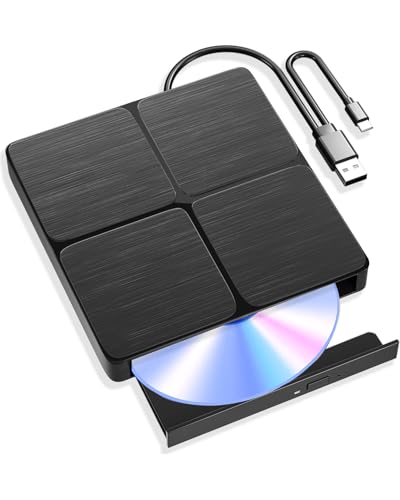
The Alphami drive offers both USB 3.0 and Type-C interfaces for fast data transfer, delivering 6x Blu-ray reading, 8x DVD, and 24x CD speeds with convenient plug-and-play operation. It emphasizes no driver requirements for PC playback with supported software recommendations for Blu-ray content on Mac or PC.
Best for: Users who want a straightforward, dual-interface drive that works smoothly with a wide range of PCs and Macs. It’s a reliable choice for everyday disc reading, writing, and basic playback setup with appropriate software.
Why this one: The dual-interface design supports modern laptops that use USB-C, while maintaining compatibility with USB-A. The caveat is that Blu-ray playback often needs dedicated software on some systems.
Caution: Mac users should plan to install Blu-ray playback software separately for proper disc viewing and may need compatible players for best results.
Buying Guide: Key Considerations for Blu-ray Drives
What to look for when choosing a Blu-ray drive
- Interface compatibility: Ensure the drive supports USB-C and USB-A (USB 3.0) if you have a mix of devices. Dual-interface models offer the most flexibility.
- Disc capabilities: Consider whether you need BD-R/BD-RW burning, BD-XL support, or UHD 4K Blu-ray features. Not all drives support 4K playback everywhere.
- Storage extras: Some models include external HDD enclosures or SD/TF card slots, which can be convenient for file transfers and archiving.
- Software requirements: Blu-ray playback may require third-party software on both Windows and macOS. Verify compatibility with your preferred player.
- Build quality: Aluminum or premium casings can offer better durability and heat management, especially for desktop setups.
Common buyer scenarios
- Frequent travelers or students: A compact, portable drive with a stable dual-interface connection is ideal.
- Home theater or media creators: A desktop drive with robust reading speeds and reliable burning along with potential UHD support is valuable.
- Photographers or content professionals: Drives with card slots and additional USB hubs help consolidate media transfers.
Operational notes and limitations
- UHD Blu-ray playback effectiveness varies by operating system and software; some platforms require separate players.
- Not all drives support 4K Blu-ray playback on all devices; confirm your system’s compatibility with UHD features.
- Some drives may not be compatible with certain BD recorders, tablets, or smart TVs; check the product’s compatibility notes before purchase.
FAQ: Quick answers for buyers
- Q: Do these drives require external power? A: Most USB-powered drives work via USB, but some desktop setups or higher-performance units may supply external power.
- Q: Can I play Blu-ray discs on macOS without extra software? A: Many discs require third-party Blu-ray player software; verify your preferred software supports Blu-ray playback.
- Q: Will these drives burn Blu-ray discs? A: Several models offer BD-R/BD-RW burning capabilities, depending on the unit.
- Q: Is UHD 4K Blu-ray playback supported on all models? A: Not universally; confirm 4K support and software requirements for your OS and hardware.
- Q: Are SD/TF card slots common on Blu-ray drives? A: Some models include card slots, which can simplify media transfers for photographers and videographers.
- Q: Do I need drivers to use these drives? A: Most drives are plug-and-play, but Windows or Mac may require additional software for Blu-ray playback or advanced features.