Answering the buyer’s question: these are beginner to intermediate Bitcoin mining options that emphasize learning, low power use, and easy setup. Each product below is best for different needs—educational exploration, quiet home use, or simple solo mining experiments. The summary table helps you compare at a glance.
| Product | Hash Rate | Power | Best For | Notes |
|---|---|---|---|---|
| kakaone Bitcoin Miner | Up to 1000 KH/s | 1.5W | Beginners and educational use | 2.8″ display, silent, firmware update advised |
| Bitaxe Gamma 602 (Vynel) | 1.8 TH/s | 35W | Home crypto mining with low noise | Open to user control via WiFi |
| Heltec Bitcoin Lottery Miner | Up to 1000 KH/s | 1.5W | Compact solo mining at home | 2.8″ display, silent |
| FREENOVE Bitcoin Miner Solo Lottery | Up to 630 KH/s (software dependent) | Low power (varies) | Educational projects with ESP32 | Touch screen and programmable features |
| NerdQaxe++ Silent Bitcoin Miner | 6 TH/s | 100W | Open-source DIY mining with high efficiency | Includes power supply and stand |
Kakaone Bitcoin Miner: Learn and Mine

The Kakaone Bitcoin Miner is designed as an educational solo miner with a 2.8-inch TFT display. It delivers up to 1000 KH/s in hash rate, suitable for beginners to learn blockchain hashing principles. It operates at a low 1.5W, supporting 24/7 use with minimal electricity cost and a quiet, fanless design for home or office desks. The device includes pre-installed test wallet data, which should be cleared and reconfigured before first use. Firmware upgrade is recommended to avoid 80% stalls during operation.
- Best for: learners who want visible, real-time mining data on a personal device.
- Why selected: combines education-friendly hash rates with a compact, silent footprint.
- Caution: firmware upgrades are important to prevent operational stalls.
Bitaxe Gamma 602: Quiet Home Miner

The Bitaxe Gamma 602 offers a strong balance of performance and power efficiency with 1.8 TH/s at only 35W. Its BM1370 ASIC chip provides robust solo mining capability while remaining quiet enough for home use. The compact desktop form factors and built-in WiFi allow simple configuration via a web browser and live monitoring of hash rate and status. It’s a solid choice for beginners who want meaningful mining power without high energy costs.
- Best for: beginners who want noticeable mining results without noisy operation.
- Why selected: high efficiency and desktop-friendly design.
- Caution: higher hash rate means more power draw than ultra-educational devices.
Heltec Bitcoin Lottery Miner: Compact Solo Miner
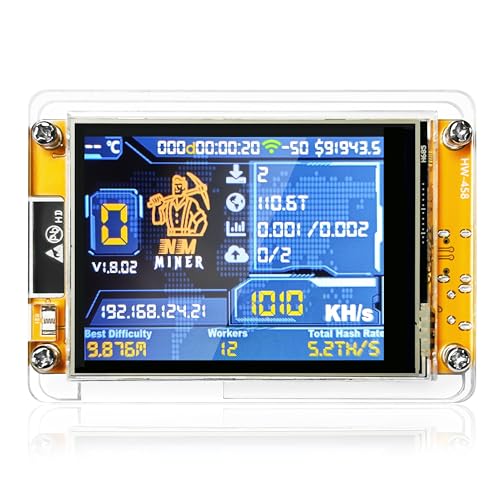
The Heltec NerdMiner V2 uses a 2.8-inch display to show live mining data, including status, hash rate, power use, and WiFi connection. It achieves up to 1000 KH/s and runs at a claimed 1.5W, which supports continuous operation in quiet environments like an office or bedroom. As a lottery-style solo miner, it is well-suited for learners who want immediate visual feedback and straightforward setup.
- Best for: users who want a visible, real-time mining readout on a compact device.
- Why selected: strong educational value with a clear interface.
- Caution: ensure firmware is up to date to avoid stability issues.
FREENOVE Bitcoin Miner Solo Lottery: ESP32 Education Kit

The Freenove Bitcoin Miner Solo Lottery uses an ESP32 with a 4.0″ touch display for programmable mining experiments. It supports WiFi and Bluetooth, with onboard ESP32 for dual-core processing up to 240 MHz. It can function as a complete miner with USB power and WiFi, though software installation or upgrade may be required. The larger touch display aids in learning and troubleshooting for hobbyist projects.
- Best for: hands-on learners who enjoy programming and hardware tinkering.
- Why selected: integrates a larger display and programmable microcontroller for experiments.
- Caution: software setup can require a computer or smartphone for initial configuration.
NerdQaxe++ Silent Bitcoin Miner: High-Efficiency Home Use

The NerdQaxe++ delivers 6 TH/s at about 100W, using four BM1370 ASIC chips. It emphasizes ultra-quiet operation and open-source AxeOS firmware with options for 2.4G Wi-Fi or Ethernet. This model suits users seeking stronger solo mining capability in a home setting while maintaining flexible connectivity and open-source controls.
- Best for: users who want higher mining power with open-source firmware and quiet operation.
- Why selected: higher hash rate in a quieter package, with flexible networking options.
- Caution: higher energy use compared to educational, low-power options.
Buying Guide: Key Purchase Considerations
- Purpose: Are you learning, experimenting, or aiming for real solo mining? Choose a device that aligns with your goal and tolerance for electricity use.
- Power and heat: Low-power devices are ideal for home use and learning. Higher hash-rate miners require more cooling and a stable power supply.
- Display and monitoring: A built-in screen helps track performance in real time; Wi‑Fi or Ethernet enables remote monitoring and control.
- Software and firmware: Open-source firmware offers customization but may require technical know-how. Ensure firmware is actively supported to avoid stability issues.
- Noise: Fanless designs and low-noise miners are better for homes and apartments; consider placement accordingly.
- Upgrades and compatibility: Check whether you can upgrade software, swap modules, or reconfigure parameters as you learn more about mining concepts.
FAQ
- What is the best beginner Bitcoin miner for education? Look for devices with clear displays, simple setup, and low power usage; models like the kakaone or Heltec miners fit this profile.
- Can I mine Bitcoin at home with these devices? Yes, but expect limited returns and ensure adequate power and cooling. These options are more educational or for light solo mining.
- Is open-source firmware important? Open-source firmware offers customization and transparency but may require more technical knowledge to operate safely.
- Do these devices require special wallets? Most come with test data or require you to configure your own wallet data before use.
- How much power do mining devices typically use? Low-power educational devices can use around 1.5W, while higher-performance miners may use tens of watts or more.
- What should I consider before buying a Bitcoin miner? Hash rate, power consumption, noise level, ease of setup, and upgradeability are key factors for first-time buyers.