Answering the call for simplicity and safety, these big-button mobile phones are designed for easy dialing, loud sound, and straightforward use. This guide highlights options suited for seniors who value large keys, simple menus, and essential features like SOS alerts or loud speakers. The top picks cover unlocked models, carrier-specific options, and flip designs. A quick buyer’s table helps compare core traits at a glance.
| Product | Type | Best For | Key Benefit |
|---|---|---|---|
| artfone A400 Big Button | Bar-style | Seniors needing large keys and SOS | Unlocked with hearing assistance and big keypad |
| LIVELY Jitterbug Flip2 | Flip | Those who prefer a clamshell design | 24/7 U.S. support after activation |
| Tracfone TCL Flip 3 | Flip | Budget-first buyers needing dual displays | Decent battery life and dual displays |
| Easyfone T200 | Bar | No Internet; basic calls/texts | Clear sound; long standby |
| artfone G6 Flip | Flip | Advanced basics with SOS | Backlit keys; strong durability |
artfone A400 Big Button Cell Phone for Seniors

The A400 is a 4G LTE unlocked phone designed for calls and SMS with a large, backlit keypad and raised keys. It emphasizes accessibility with a built-in hearing assistance mode to amplify voices. It is compatible with several T-Mobile-based carriers and excludes CDMA networks. Best for seniors who want a simple, tactile device with an SOS-style capability via emergency dialing and a straightforward UI.
Who it’s best for: Seniors who need large buttons, a dedicated SOS-style setup, and reliable cellular connectivity without internet browsing. Ideal for caregivers seeking a no-frills phone for essential communication.
Why chosen: Clear, large keypad reduces dialing errors. Hearing assistance helps in conversations, and the unlocked status provides flexible carrier choice.
Limitations: No internet access and no camera; not ideal for users who want app-based features or web browsing.
LIVELY Jitterbug Flip2

The Jitterbug Flip2 is a flip-phone designed for easy use with a high-contrast screen, big buttons, simple menus, and one-touch speed dial. It requires activation with Lively service, including ongoing 24/7 support from a U.S.-based team and optional Urgent Response service. Best for seniors who prefer a flip form factor and value strong customer support.
Who it’s best for: Users who want a familiar flip-phone experience with reliable senior-focused support plans.
Why chosen: One-touch speed dial and loud speaker improve usability, while 24/7 support adds reassurance for emergencies or questions.
Limitations: Requires Lively service; ongoing costs depend on plan choices, which may be more than a basic plan for some users.
Tracfone TCL FLIP 3

The TCL Flip 3 combines a classic flip design with dual displays and a long-lasting battery. It emphasizes simplicity for phone calls and basic messaging while offering reliable call quality with a dual microphone setup. Best for budget-conscious buyers who want a dedicated flip phone with practical battery life.
Who it’s best for: Users who prefer old-school flip functionality and straightforward operation without modern app clutter.
Why chosen: Dual displays aid visibility and navigation, while extended talk time supports longer conversations without frequent charging.
Limitations: Limited feature set compared to smartphones; no internet browsing is standard, which may frustrate some users seeking more connectivity.
Easyfone T200 4G Unlocked

The Easyfone T200 is a straightforward bar-type phone focused on calls and texts. It features a simple operating system, loud sound, and no-internet design with a long standby battery. Best for users who want a compact, reliable device without online features.
Who it’s best for: Seniors seeking a basic device with strong acoustics and a long standby period.
Why chosen: Clear usability and physical simplicity help reduce dialing mistakes and cognitive load during daily use.
Limitations: No camera or internet access; lacks multimedia capabilities that some users might expect from mobile devices.
artfone G6 Flip Phone for Seniors
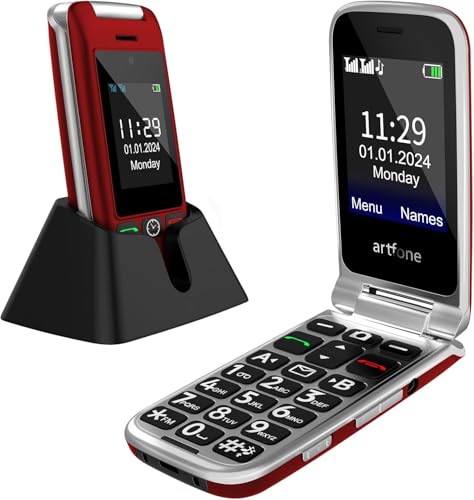
The G6 Flip combines a familiar flip-phone experience with 4G LTE connectivity, backlit keys, and an SOS button alongside 21 oversized buttons. It includes a durable hinge and a lanyard attachment for portability. Best for seniors who want a robust flip-phone with quick-access safety features.
Who it’s best for: Users who prioritize a durable flip design and easy dialing with safety features.
Why chosen: Large-key backlit layout plus an SOS-style button provides quick help while maintaining a classic form factor.
Limitations: Carrier compatibility is mainly T-Mobile-based; verify local carrier support before purchase.
Buying Guide: Big Button Phones for Seniors
Key considerations help ensure you pick a device that fits daily needs and safety requirements.
- Form factor: Flip phones offer physical key familiarity; bar phones provide straightforward tapping and scrolling. Choose based on comfort with the device’s folding action or button layout.
- Carrier compatibility: Some models are unlocked and work across 4G networks, while others pair with specific prepaid services. Confirm network support in your area and with your chosen carrier before buying.
- SOS and safety features: Look for dedicated emergency buttons, quick-dial options, and loud, clear audio to facilitate easier calls in urgent situations.
- Audio quality: Prioritize devices with amplified sound, large keys, and high-contrast displays for visibility and audible clarity.
- Battery life: A long standby or talk-time battery reduces the need for frequent recharging, especially for seniors who use phones intermittently.
- Durability: For everyday handling, a sturdy hinge (in flip models) or reinforced body can extend device life and reduce accidental damage.
- Internet access: If simplicity is the goal, prefer no-internet models; if occasional browsing or apps are desired, ensure the device supports basic web access and essential apps safely.
- Ease of use: Look for straightforward menus, backlit keys, and a clear interface with large fonts and icons to minimize confusion and errors.
Frequently Asked Questions
- What is a big-button phone best for?
Big-button phones are best for seniors who need large, easy-to-press keys and simple menus to reduce dialing errors and confusion.
- Do big-button phones require internet access?
Many models are designed for basic calls and texts without internet, though some offer limited web access or apps. Check the device specification for internet capabilities.
- Are flip phones still reliable for emergencies?
Yes. Flip phones with loud audio, large keys, and emergency or SOS features can be dependable for urgent calls and quick assistance.
- Can I use these phones with any carrier?
Some are unlocked for multiple carriers; others require specific services. Verify compatibility with your preferred carrier before purchasing.
- What’s the advantage of hearing assistance on these phones?
Hearing assistance helps amplify voices during calls, improving clarity for conversations with caregivers or family members.
- Is a no-internet phone safer for seniors?
Generally, yes. Limiting web access reduces exposure to online risks and distractions, focusing use on calls and texts.