If you’re searching for a big-button mobile phone tailored to seniors, you want a device that prioritizes clarity, reliability, and easy dialing. This guide highlights five top options, each chosen for simple operation, amplified sound, and straightforward features. Ideal buyers include caregivers seeking a dedicated calling device, seniors who prefer large keys over touchscreens, and those needing built-in safety features like SOS buttons. Below is a quick comparison and a Buying Guide to help you choose the right model for your needs.
| Product | Best For | |
|---|---|---|
| Artfone A400 | Very easy dialing, long battery life | 4G LTE, SOS button, large backlit keypad, speed dial, volume boost |
| Lively Jitterbug Flip2 | Stay connected with care-team support | One-touch speed dial, high-contrast screen, powerful speaker, 24/7 help |
| Lively Jitterbug Smart4 | Simple smart features with urgent assistance | Voice calling, real-time captions, Urgent Response, easy navigation |
| Tracfone TCL Flip 3 | Reliable flip-phone with long battery | Dual displays, dual mic with noise cancellation, long battery life |
| Artfone G6 Flip | Durable flip phone with large keys | 2G/3G/4G LTE, hearing assistance, 21 oversized buttons, durable hinge |
Artfone A400 Big Button Cell Phone for Seniors

Best for seniors who need a dedicated calling device with an amplified keypad and SOS support. The A400 offers 4G LTE connectivity and a raised, backlit keypad designed for easy dialing. It emphasizes straightforward calls and SMS over internet access, making it ideal for users prioritizing reliability and simplicity.
Why selected The large numeric keys, visible colors, and audible feedback reduce dialing errors. The SOS button adds a quick safety option, while the speed-dial feature accelerates frequent contacts. The device is unlocked, allowing flexible network use with compatible carriers.
Limitations It does not support CDMA carriers and may not be suited for users who require web browsing or app access.
LIVELY Jitterbug Flip2 Cell Phone for Seniors

Best for users who want supervision and support through a care-focused service. The Flip2 is designed around a dedicated phone service with easy menus, one-touch speed dial, a strong speaker, and a handy help button on the keypad.
Why selected The option to use 24/7 U.S.-based support provides reassurance. It’s a straightforward flip phone with a high-contrast display and large buttons, supporting reliable calls and texts without internet complexity.
Limitations Requires activation with Lively’s service and ongoing plan commitment; not a standalone unlocked phone for general carriers.
LIVELY Jitterbug Smart4 Senior Smartphone

Best for seniors who want simple smartphone capabilities with safety features. The Smart4 balances usability with essential smart features and Urgent Response for emergencies.
Why selected It provides larger screens and easy navigation while offering real-time captions and a dedicated help service after activation, which can be beneficial for caregivers coordinating care and emergencies.
Limitations It’s a smartphone, which may introduce a learning curve for users seeking minimal app use and no data plan requirements.
Tracfone TCL Flip 3 Flip Phone

Best for users seeking a reliable flip-phone with clear call quality and long battery life. The dual displays and dual microphone with noise cancellation aid readability during conversations.
Why selected The 1850 mAh battery supports lengthy talk time, and the flip design preserves simplicity while still offering modern connectivity. It’s a solid bridge between classic simplicity and current networks.
Limitations May lack some modern smart features, and network compatibility should be confirmed with your chosen carrier before purchase.
Artfone G6 Flip Phone for Seniors
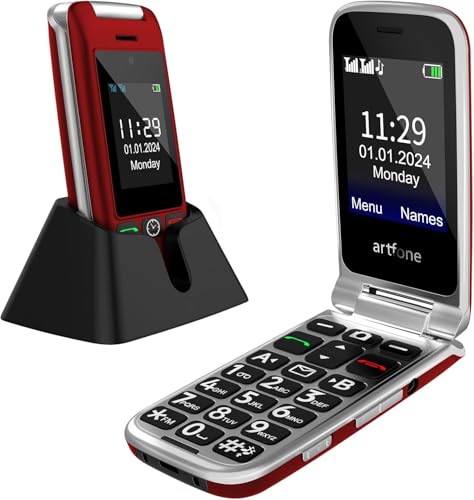
Best for users wanting a robust flip-style phone with a large backlit keypad and hearing assistance. The G6 Flip emphasizes durable design and accessibility features.
Why selected Its oversized keys and built-in hearing assistance support clearer conversations. A 170-degree hinge and 21 large buttons make everyday dialing easier, especially for poor eyesight or tremors.
Limitations Carrier compatibility is tailored toward certain networks; verify compatibility with your service before purchasing.
Buying Guide
What to consider when choosing a big-button phone for an elderly user
- Phone type: Bar, flip, or smartphone. Bar phones offer the simplest experience, while flip designs add tactile feedback. Smartphones add apps, but may require more learning.
- Display and keypad: Look for large, high-contrast displays and clearly labeled, oversized buttons with backlighting for visibility at a glance.
- Sound and hearing features: Consider amplified volume, clearer microphones, and any built-in hearing assistance to improve intelligibility during calls.
- Connectivity: Decide between 4G LTE or older networks; ensure carrier compatibility if you choose a device not unlocked for all carriers.
- Safety features: An SOS button or Urgent Response capability adds quick access to help in emergencies.
- Battery life: Longer standby and talk times reduce charging frequency and improve reliability for daily use.
- Service plan: Some devices require carrier-specific plans or services (like Lively); confirm ongoing costs and support options before buying.
How to compare these five models quickly
- Best overall for simple calls: Artfone A400 or G6 Flip, depending on preferred form factor (bar vs flip).
- Best care-support option: LIVELY Jitterbug Flip2 or Smart4 for access to service and Urgent Response.
- Best battery life: Flip-style options like TCL Flip 3 or Artfone flip models typically deliver extended talk time.
FAQ
- Do big-button phones support modern carriers?
- Is a big-button phone harder to learn than a regular phone?
- What safety features are common?
- Should I buy a smartphone or a feature phone for an elderly user?
- How important is battery life?
- Can I mix compatibility with different carriers?
Many do, but always check carrier compatibility before purchase. Some models are unlocked or designed for specific networks.
Not necessarily. Simpler interfaces and physical keys can reduce frustration for first-time users with limited tech experience.
Common features include SOS buttons, Urgent Response services, and loud audio for clearer conversations.
Feature phones with large keys are generally easier for non-tech users, while smartphones suit those who want apps with accessibility options.
Very important. A longer battery means less frequent charging and more reliable use during the day.
Some models are carrier-specific; others are unlocked. Always verify network compatibility and SIM requirements before buying.