If you’re seeking a precise, palm-rejection stylus with fast charging and solid compatibility, these Apple Pencil alternatives are designed to fit a wide range of iPad models from 2018 onward. They’re ideal for students, professionals, and casual doodlers who want responsive drawing, note-taking, and quick navigation without relying on Apple’s own accessory. Below you’ll find five strong options, each evaluated for who benefits most and why it was selected.
| Product | Best For |
|---|---|
| JAMJAKE Stylus Pen for iPad | Best all-rounder with broad model support |
| Metapen Air8 | Best lightweight design and long battery life |
| DIGIROOT iPad Pencil | Best value with fast charging and palm rejection |
| ESR Geo Digital iPad Pencil | Best find-my integration for misplaced styluses |
| ZAGG Pro Stylus | Best dual-tip for navigation and writing |
JAMJAKE Stylus Pen for iPad

The JAMJAKE stylus targets iPads released from 2018 through 2026, including iPad Pro, Air, Mini, and standard iPads. It features palm rejection, a precise 1.5 mm tip, and a 2x fast charge capability. Its broad compatibility makes it a versatile choice for mixed-device households or classrooms. It is not compatible with Apple Pencil models or iPhone/Android devices, so buyers should confirm their exact iPad generation before purchase.
Who this is best for: Users with multiple iPad devices or those who want a single accessory across generations. Why chosen: It combines responsive tip precision with quick setup and easy tip replacement, offering a practical balance of performance and value. Caution: It does not supply pressure sensitivity, which may matter to artists who rely on subtle line weight variations.
Metapen iPad Pencil A8

The Metapen A8 emphasizes precision with a 0.1 mm pixel-precise tip and fast USB-C charging. It delivers up to 10 hours of use after a 30-minute charge, and its auto-shutdown helps conserve power. Note that it does not support magnetic charging or iPad magnetic attachment, which means it won’t attach to the iPad edge for storage. The stylus is suited for detailed note-taking and drawing, though it lacks pressure sensitivity.
Who this is best for: Users who want near-paper-like precision for fine drawing and writing and who don’t need pressure sensitivity. Why chosen: The high-precision tip and rapid charging make it a strong performer for detail work at a reasonable price. Caution: No pressure sensitivity, which can limit brush-like effects for artists.
Metapen Pencil Air8

The Air8 is designed for lightweight use with a stated 0.1 mm pixel precision and palm rejection. It touts a notably long standby life and fast charging—45 minutes to reach up to 20 hours of use. It weighs about 10 g, offering a comfortable, fatigue-reducing experience for extended sessions. Note that it does not support pressure or tilt sensitivity, which can affect line dynamics for art projects.
Who this is best for: Writers and students who want a featherlight, long-lived stylus for fast note-taking and casual drawing. Why chosen: Excellent battery life and low weight; best for long study sessions. Caution: Lacks pressure sensitivity and tilt support that some artists expect.
ESR Geo Digital iPad Pencil

The ESR Geo Pencil offers compatibility with a broad set of 2018+ iPads and emphasizes Find My integration for locating a misplaced stylus. It claims fast charging and a magnetic-friendly design, though official support notes indicate not all functions are compatible with every iPad model. Features include magnetic compatibility and easy charging via USB-C, with no wireless charging on the iPad itself. It’s a practical choice for organized users who value quick access and reliability in daily note-taking and drawing tasks.
Who this is best for: People who want Find My compatibility to track their stylus and a magnetic-like attachment for convenient storage. Why chosen: The Find My feature reduces the risk of loss and adds a practical layer of everyday usability. Caution: Not all iPad models may support every function; verify your device before buying.
ZAGG Pro Stylus
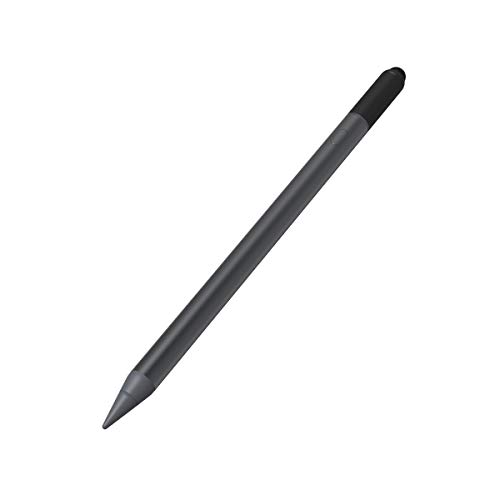
The ZAGG Pro Stylus blends a dual-tip design, combining a capacitive back-end tip for navigation with an active writing tip for precise lines. It also includes palm rejection and tilt recognition, along with instant Bluetooth pairing. This model positions itself as a versatile tool for note-taking, sketching, and document markup on a range of iPad models. It is particularly appealing for users who want a single stylus capable of both navigation and precise writing with reliable pairing.
Who this is best for: Artists and productivity users who want a dual-tip approach for navigation and writing, plus strong palm rejection. Why chosen: Dual-tip design gives flexible control and a robust feature set. Caution: Some users may prefer a lighter or thinner tip profile for delicate detail work.
Buying Guide
What to consider when choosing an Apple Pencil alternative:
- Device compatibility: Confirm your exact iPad model and year. Some styluses support only 2018 and newer generations; others cover a broader range.
- Tip precision vs. pressure sensitivity: If you need pressure-sensitive lines or tilt-based shading, look for models explicitly listing these features. Some alternatives offer high precision without pressure sensitivity.
- Charging and battery life: Check charge time and how long you can use the stylus per full charge. USB-C charging is common; magnetic charging may be present in some models.
- Palm rejection: Important for natural writing; ensure the stylus advertises palm rejection to avoid accidental touches.
- Attachment and storage: Magnetic attachment can help prevent loss, but verify compatibility with your iPad model and case.
- Find My or tracking features: If you frequently misplace accessories, a Find My-enabled stylus adds value.
FAQ
- Do these styluses require Bluetooth pairing? Some models use Bluetooth for shortcuts or Find My integration; others operate with simple passive tracking. Always check product notes for pairing requirements.
- Is pressure sensitivity available on these alternatives? Many do not offer true pressure sensitivity. If you rely on dynamic line weights, verify this before purchasing.
- Can I use these with any iPad model? Compatibility varies by model and year. Confirm your device generation and iPadOS version before ordering.
- Do these come with extra tips or nibs? Several listings include spare tips or accessories. Review the product description for included extras.
- Will I be able to charge these on a standard USB-C charger? Most options use USB-C charging; ensure you have a compatible charger or cable before use.
- Is magnetic attachment supported for storage? Some models advertise magnetic or magnet-like attachment; verify compatibility with your iPad and case.