The best Android tablet for kids blends safety, parental controls, durable design, and engaging content. This guide highlights five top options, explains who each is best for, and shows why they stand out. It’s ideal for parents seeking a balance of learning apps, screen time management, and reliable performance. The top picks range from sturdy 7–10 inch models with strong parental controls to larger, feature-rich tablets designed for older children.
Buyer snapshot: the top five picks below cover a range of ages and needs. Use this quick reference to compare who each tablet is best for, plus a note on a potential limitation.
| Product | Best For | Key Benefit |
|---|---|---|
| COLORROOM 2026 Android 15 Kids Tablet (Blue) | Young children learning basics | Strong Android 15, large RAM and storage, kids space |
| URAO Android 16 Kids Tablet 10” (Case Included) | Active kids who need robust parental controls | Latest Android 16, expandable storage, strong controls |
| PEICHENG Kids Tablet 7” Android 12 | Portability and starter tablets | Compact, affordable, parental controls |
| ZZB 10” Android 15 Tablet for Kids | Balanced features and budget | 8GB+32GB, microSD expansion, dual cameras |
| Amazon Fire HD 10 Kids Pro | Older kids, built-in ecosystem | Kids+ library and strong parental controls |
COLORROOM Android 15 Tablet Blue

The COLORROOM 2026 Android 15 tablet is designed for kids with a stable Android 15 system, an octa-core CPU, and a robust 10GB RAM/64GB storage. Best for elementary-aged children who stream videos, read e-books, and use learning apps. The Google Kids Space + parental controls help filter content and set time limits, creating a safer digital environment. A caution: the 1TB expansion relies on external storage; plan for SD expansion if large media libraries are needed. This model is well suited for: learning apps, family video chats, and age-appropriate content.
Why selected: It combines a big memory footprint, long battery life, and kid-focused software space. The anti-blue light display helps reduce eye strain during longer sessions. Suitable for kids who need smooth multitasking and a safe space for guided screen time.
Best for: younger learners who benefit from Google Kids Space and clear parental boundaries. Better for families needing a larger internal storage buffer and robust management tools. Choose this if you want a dependable Android experience with an emphasis on kid-friendly content.
URAO 10” Android 16 Kids Tablet (Case Included)

The URAO Kids Tablet runs Android 16.0, pairing a 2.0 GHz octa-core processor with 20GB RAM and 64GB ROM, expandable to 1TB. Best for families seeking safer browsing and advanced parental controls, including profile creation and screen-time limits. A limitation: the 1TB expansion requires a microSD card (not included). This model suits kids ages roughly 6–12 who need fast performance and robust control over content and usage.
Why selected: It provides safer software with ad removal options and a strong emphasis on parental oversight. The expandable storage supports large apps and offline media for school projects. Best for: students who juggle educational apps and offline media while maintaining strict controls. Better for: parents who want detailed, customizable profiles and strict screen-time rules.
PEICHENG Kids Tablet 7” Android 12

This 7-inch Android 12 tablet focuses on portability and essential parental controls. Best for younger children or travelers who need a compact device for learning apps, reading, and light video watching. Storage is 32GB with micro SD expansion up to 512GB, providing a straightforward balance of cost and capacity. A potential limitation is smaller screen size, which can affect readability for some apps and content.
Why selected: Its size makes it easy for small hands and parents who want an affordable starter tablet. The parental controls help set limits and ensure safe browsing. Suitable for: early elementary ages or as a secondary device for younger siblings. Choose this if you want a compact, budget-friendly option with solid safety features.
ZZB 10” Android 15 Tablet for Kids
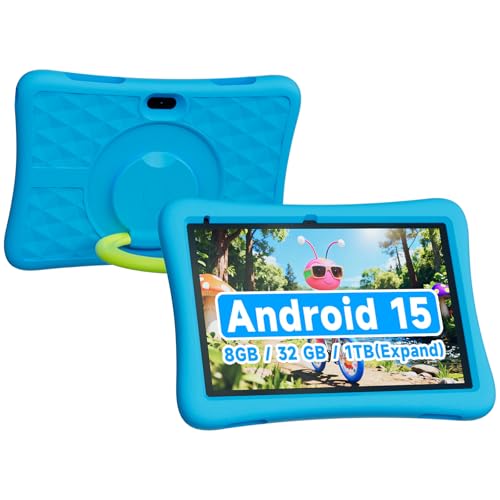
ZZB’s 10-inch Android 15 tablet offers a balanced mix of features and value. Best for families seeking a durable tablet with expandable storage (32GB internal plus up to 1TB via microSD). The 8GB RAM and dual cameras support smooth multitasking and basic multimedia projects. A limitation: the included RAM/storage configuration may be stretched with heavier apps or media libraries.
Why selected: It provides a larger display for reading and learning apps while keeping the price accessible. The microSD expansion helps future-proof storage needs for apps and media. Best for: kids who benefit from a bigger screen and a straightforward, cost-effective setup. Choose this if you want a capable all-rounder that won’t break the bank.
Amazon Fire HD 10 Kids Pro Tablet

The Fire HD 10 Kids Pro offers a curated kid-friendly experience with a robust parental controls suite and access to Amazon Kids+. Best for families already invested in the Amazon ecosystem or those seeking a wide content library. It includes a 10.1″ display and a cushiony case. A caveat: content and app availability may vary by region, and ongoing access to Amazon Kids+ depends on subscription. This model is ideal for: older kids who consume a lot of digital books, videos, and apps within a controlled environment.
Why selected: Its dedicated content library and parental dashboard provide a mature, centralized management experience. The included Kids+ subscription adds value for recurring content. Better for: households familiar with Amazon’s ecosystem or families prioritizing a broad content offering and strong parental controls.
Buying Guide: Key Considerations For Android Tablets For Kids
- Age and screen time: Match tablet features to your child’s age. Younger kids benefit from simpler interfaces and stronger content filtering.
- Parental controls: Look for time limits, app approvals, content filters, and profile-based controls. These features help adapt access as kids grow.
- Storage and expandability: 32GB–64GB base storage plus microSD expansion supports apps, ebooks, and media for school projects.
- Display and eye comfort: 1280×800 or higher with anti-blue-light modes reduces eye strain during longer sessions.
- Durability: Consider a rugged case or bump-friendly design for younger users and travel scenarios.
- Content ecosystem: A curated app store or Kids+ library can simplify safe, age-appropriate content selection.
- Battery life: A larger battery helps extend screen time between charges, especially for homework sessions and entertainment.
- Platform updates: Android 16.0 or Android 15 provides newer features and security improvements compared with older versions.
- Upgrade path: If a child outgrows a tablet, ensure the device can still support essential apps or be repurposed for learning tools.
FAQ
- What is the best Android tablet for a younger child?
Answer: Look for tablets with strong parental controls, a kid-friendly interface, durable design, and a content space like Google Kids Space or Kids+. - Should I choose a 10-inch tablet or a smaller one?
Answer: A 10-inch model balances readability and portability, suitable for schoolwork and media; smaller models are easier for little hands. - Is expandable storage important for kids tablets?
Answer: Yes, microSD expansion up to 512GB–1TB enables more apps, photos, and offline media for school projects. - Do parental controls affect performance?
Answer: They can slightly limit background content, but modern tablets manage controls without noticeable slowdowns. - Are there non-amazon alternatives with strong safety features?
Answer: Yes; several brands offer Google Kids Space and robust parental controls independent of Amazon’s ecosystem. - What about blue light and eye protection?
Answer: Look for blue-light filtering or anti-blue-light display features to reduce eye strain during long usage periods.