Looking for the best all-in-one PCs that blend compact design with solid performance? This guide highlights five strong options and explains who each is best for. Whether you need a budget-friendly everyday computer, a classroom-ready setup, or a business-ready workstation, these all-in-one systems offer streamlined connectivity, space-saving design, and practical features for work, study, and entertainment.
The following table summarizes the selected models, focusing on key strengths and ideal buyer types.
| Product | Main Strength | Best For |
|---|---|---|
| HP 24″ OmniStudio All-in-One | Solid balance of Core performance and a bright IPS display | Home and light-work multitasking |
| BlairTech ChromeOS Flex All-in-One | ChromeOS Flex for cloud-based tasks and classrooms | Education and cloud-first environments |
| Dell 23.8″ All-in-One | Vivid display with comfort features and solid webcam | Remote work and media consumption |
| OuuOee 15.6″ Touch All-in-One | Integrated touchscreen with flexible 360°/180° adjustments | Interactive work, POS, and compact spaces |
| Lenovo 24″ All-In-One | Strong RAM/SSD combo for multitasking | Small office and home offices needing more memory |
HP 24-Inch OmniStudio All-in-One Desktop

Best for: Home users and light multitaskers needing a balanced set of features. This model pairs an Intel Core processor with 4 cores up to 3.8GHz and a 23.8″ FHD IPS display with 99% sRGB. It includes 128GB USF storage and 8GB DDR5 RAM for smooth everyday browsing, document work, and media consumption. Connectivity is modern with WiFi 6 and Bluetooth 5.2, plus multiple ports for accessories and external displays. Caution: The 128GB storage may fill quickly with media and apps; consider external storage for larger libraries.
BlairTech Google ChromeOS Flex All-in-One PC

Best for: Educational environments or users who prefer cloud-based tasks and quick boot times. ChromeOS Flex provides a streamlined experience focusing on web and cloud apps. The system uses an Intel Core i5, 8GB RAM, and 128GB SSD for responsive performance in browsing, streaming, and schoolwork. It’s space-saving and ships with a clean, clutter-free setup. Caution: It does not run traditional Windows software; plan accordingly if Windows-specific apps are required.
Dell 23.8-Inch All-in-One Desktop

Best for: Users seeking vivid visuals and eye-friendly features. The FHD IPS display with 99% sRGB provides accurate colors, and Dell ComfortView Plus reduces blue light for long sessions. An included 5MP+IR camera supports video calls with adjustable tilt. Caution: The listing emphasizes display quality and comfort features; compare performance tasks against your must-run software requirements before buying.
OuuOee 15.6″ All-in-One Touchscreen
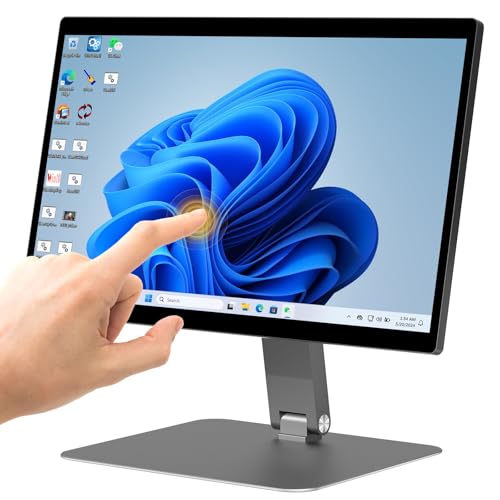
Best for: Interactive workspaces and compact areas thanks to the 15.6″ touchscreen and 360°/180° adjustability. The N5095 processor with up to 3.4GHz, 8GB RAM, and 128GB storage support everyday tasks, with HDMI 2.0, WiFi 5, and Bluetooth 5.0 enabling flexible installations for offices, kiosks, and classrooms. Caution: Touchscreen-focused features may require compatible software for full desktop productivity in Windows environments.
Lenovo 24-Inch All-In-One Desktop

Best for: Small offices needing strong multitasking with ample RAM. The Lenovo model delivers a 24″ FHD display, 16GB DDR4 RAM, and a 256GB PCIe SSD, along with WiFi 6 and Bluetooth 5.2. It’s well suited for productivity, web-based tasks, and light content creation. Caution: The display is non-touch, which may be a limitation for users who rely on touch input for certain workflows.
Buying Guide
What should you consider when choosing an all-in-one PC?
- Performance needs: Match CPU and RAM to your workload. Light tasks don’t require top-tier cores; RAM bigger than 8GB helps with multitasking.
- Storage: Look for SSDs for fast boot and load times. If 128GB is tight, plan for external storage or cloud options.
- Display quality: A larger, high-contrast IPS panel enhances productivity and media consumption. Consider anti-glare and color accuracy needs.
- Operating system: Windows offers broad software compatibility; ChromeOS Flex is ideal for cloud-based tasks and education.
- Connectivity: Ensure sufficient USB ports, HDMI outputs, and wireless standards (WiFi 6/6E, Bluetooth) for peripherals and displays.
- Ergonomics and space: All-in-one units save desk space but check stand adjustability and mounting options for your workspace.
- Security and privacy: Consider integrated webcam features and BIOS/firmware security supported by the device.
FAQ
- What is the main advantage of an all-in-one PC?
Answer: It combines the computer and monitor in a single unit to save space and reduce cable clutter. - Is ChromeOS Flex suitable for everyday work?
Answer: Yes, for cloud-focused tasks, web apps, and classrooms; Windows-specific apps may not run. - Should I choose more RAM or more storage?
Answer: For multitasking and future-proofing, prioritize RAM; storage can be expanded with external drives or cloud storage. - What should I look for in display quality?
Answer: Look for IPS panels with wide color coverage (sRGB), good brightness, and anti-glare coating for comfortable viewing. - Are these devices good for video conferencing?
Answer: Many models include built-in webcams with varied resolutions; check camera specs and lighting compensation if video calls are important. - Do all-in-ones support upgrades?
Answer: Some models limit internal upgrades; verify RAM/SSD upgradeability with the manufacturer specifications.