Whether you crave a compact home gaming hub or a ready-to-go workstation with integrated display, all-in-one (AIO) gaming PCs offer a streamlined experience with fewer cables. This guide highlights five prominent options, showing who each device is best for and why it stands out. Ideal buyers range from students and small offices to casual gamers who want decent performance without juggling a tower and monitor.
Summary table of selected products:
- suevery All-in-One Desktop Computer, 27″ 32GB RAM, 1TB SSD — Best for immersive all-in-one gaming with ample memory.
- MECHAZER All-in-One Desktop PC 23.8″ — Best for compact space and solid mid-range performance.
- suevery All-in-One Desktop Computer, 22″ Core i5 — Best for budget-conscious gamers needing compact, capable AIO.
- MECHAZER 27″ All-in-One Desktop PC, Curved 16GB RAM — Best for curved-screen immersion and balanced specs.
- HP OmniStudio 24″ All-in-One — Best for a modern, feature-rich entry with strong connectivity.
Suevery 27-Inch All-in-One Gaming PC — 32GB RAM, 1TB SSD

All-in-One Desktop PC with a 27-inch Full HD/2K display, 120Hz refresh rate, and high memory capacity. The configuration centers on an Intel 13th Gen Core i5-13400F with 32GB RAM, delivering smooth multitasking for gaming, content creation, and everyday tasks. This model is ideal for users who want a large, vibrant screen integrated into a single unit without external computer towers.
Best for: Home offices, students, and small offices needing robust multitasking and a large display for gaming, streaming, and editing. The 32GB RAM ensures better future-proofing for running multiple apps simultaneously.
Caution: Integrated GPU performance may limit the highest detail settings in newer AAA titles at 2K resolution compared with high-end dedicated GPUs.
HP Elite Desktop Computer PC — Renewed 16GB RAM, 1TB HDD + 22″ Monitor

This refurbished package ships with a Core i5-class processor, 16GB RAM, and a 1TB HDD, paired with a new 22-inch LED monitor. It’s suited for budget-minded gamers who also want a complete setup with an included display and basic peripherals. Renewal status implies tested functionality with a warranty window.
Best for: Students or light-gaming setups where cost savings are a priority and a basic, reliable PC-plus-display solution is desired.
Caution: Renewed status means hardware refurbishments; check warranty coverage and return policy before purchase.
MECHAZER All-in-One Desktop PC — 23.8-Inch Curved Display
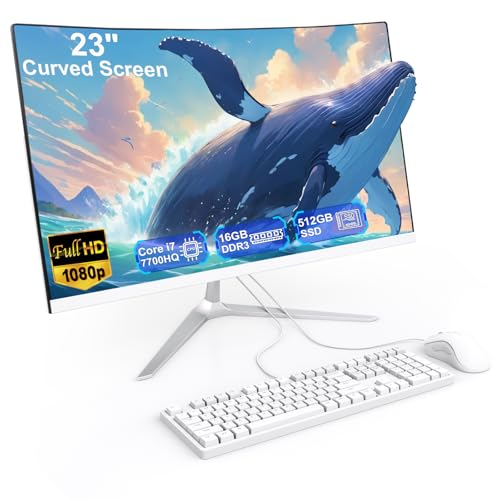
The 23.8-inch curved-display AIO integrates an Intel Core i7-7700HQ processor with 16GB RAM and a 512GB SSD. Pre-installed Windows 11 Pro helps with productivity and light gaming. The curved screen design aims to maximize immersion while preserving a compact footprint.
Best for: Users seeking mid-range performance in a curved-screen form factor, suitable for daily tasks, light gaming, and media consumption in a compact desk setup.
Caution: The i7-7700HQ is an older generation; expect limited performance in the latest AAA titles at high settings.
Suevery 21.5-Inch All-in-One Gaming PC — Core i5, 16GB RAM

This compact AIO pairs a Core i5-7300U with 16GB RAM and a 512GB SSD, balancing everyday productivity with light gaming capability on a 21.5-inch display. It’s a practical choice for dorm rooms, small apartments, or shared spaces where desk space is at a premium.
Best for: Casual gamers and students who want a space-saving PC with adequate multitasking and storage for everyday work and light gaming. Choose this if you prioritize a compact footprint over top-tier gaming performance.
Caution: The 7300U era CPU may struggle with newer, demanding games at high settings; consider lower graphics settings for better frame rates.
MECHAZER 27-Inch All-in-One Desktop — Curved FHD Display

The 27-inch curved all-in-one unit emphasizes an immersive viewing experience with a curved FHD display, paired with Core i7-7700HQ, 16GB RAM, and 512GB SSD. It includes a wired keyboard and mouse for a ready-to-use gaming and productivity station.
Best for: Users who want a larger curved screen in an AIO package, combining comfortable viewing with mid-range processing and storage. It’s suitable for streaming, light gaming, and daily tasks.
Caution: The all-in-one form factor can limit upgrade options; plan around integrated components when expectations shift toward higher-end gaming in the future.
KOTIN Prebuilt Gaming PC — RTX 5070, Ryzen 7 9700X

Powered by RTX 5070 12GB with Ryzen 7 9700X, this prebuilt targets higher-end gaming at 1440p and 4K, supported by 32GB DDR5 memory and a 1TB NVMe SSD. It also features a built-in smart display showing system temperatures and usage, offering a practical glance at hardware health during long sessions.
Best for: Gamers who need substantial GPU capability and fast memory for modern titles, plus an on-desk display to monitor performance. Choose this if you want strong gaming headroom in a single unit.
Caution: The RTX 5070 and DDR5 are capable, but the all-in-one option is less common for truly high-end upgrades; check future upgrade paths and cooling design if you push settings hard for extended periods.
Buying Guide: How to Choose the Right All-In-One Gaming PC
- Performance vs. display: If gaming is the primary goal, prioritize higher-end CPUs and GPUs; for productivity and multimedia, larger displays with accurate color and higher RAM can boost overall experience.
- Display quality and size: Larger curved or flat panels improve immersion, but take up more desk space. Consider refresh rate (60Hz vs 120Hz) and resolution to match gaming needs.
- Upgrade paths: AIOs typically have limited upgrade options beyond RAM and storage. If you expect to upgrade components, a traditional tower may be more suitable long-term.
- Memory and storage: 16–32GB RAM covers multitasking and recent games well; 512GB–1TB SSDs reduce load times. Balance SSD speed with total storage needs.
- Ports and connectivity: Look for multiple USB ports, HDMI, and robust wireless options (Wi-Fi 6/6E, Bluetooth) to connect peripherals and displays without extra hubs.
- Refurbished vs. new: Refurbished units can offer savings but may come with shorter warranty windows. Verify return policies and included accessories.
Frequently Asked Questions
- Are all-in-one gaming PCs worth it for gaming performance?
They can be convenient, offering a single integrated package with a display. For the most demanding titles at the highest settings, consider a traditional desktop with a dedicated GPU.
- Can I upgrade components in an all-in-one PC?
Upgrades are often limited. RAM and storage are common upgrade paths, but CPU, GPU, and motherboard changes may not be feasible.
- What should I consider when choosing screen size and resolution?
For gaming, a larger screen with higher refresh rate improves experience. Balance screen size with desk space; 1080p at 120Hz or 1440p at 60–120Hz are common options.
- Is a refurbished all-in-one PC reliable?
Refurbished models can provide good value if they come with a warranty and tested functionality. Check seller reputation and return terms before purchase.
- Do all-in-one PCs include peripherals?
Many packages include keyboards and mice, but verify what’s included in the listing. Some bundles also provide a monitor stand or speakers.