Finding the right 61-key MIDI controller helps you bridge your computer-based workflow with expressive playing. This guide focuses on models that offer solid key action, reliable DAW integration, and practical controls for tracking, production, and live use. Ideal buyers include bedroom producers seeking value, performers needing portable setups, and semi-professional studios wanting deep DAW control. Below is a concise summary of five strong options to consider, followed by detailed product studies and a practical buying guide.
| Product | Key Features | Best For |
|---|---|---|
| Nektar SE61 | 61 keys, Nektar DAW integration, comprehensive MIDI | Budget-conscious producers needing DAW integration |
| M-AUDIO Keystation 61 MK3 | Semi-weighted keys, transport and mixer controls, plug-and-play | Beginners and players prioritizing simplicity |
| Novation Launchkey 61 MK4 | 61 keys, DAW integration, 16 FSR pads, clip launching | Ableton users and beatmakers |
| Arturia KeyLab Essential mk3 | 61 keys, Analog Lab V, Scale/Chord/Arp features | Songwriters and sound-designers needing presets |
| M-AUDIO Oxygen Pro 61 | 61 keys, NKS integration, customizable bundles | Producers wanting deep NI ecosystem control |
Nektar SE61 USB MIDI Controller Keyboard

The Nektar SE61 emphasizes comprehensive MIDI functionality and DAW integration for popular software. Best for producers who want deep DAW control without a steep setup. The keyboard ships with expressive control features and a value-focused package. A potential limitation is that some users may prefer heavier keys for piano-style playing, which SE61 does not imply as a primary strength. This model is well suited for studio work and live rigs that rely on seamless software control.
Who should consider this: buyers seeking strong DAW integration and a compact 61-key layout without extra pads. Why selected: it delivers broad compatibility and expressive control at a value-driven price point. Caution: some users may want higher-end key action or more tactile feedback beyond standard velocity sensitivity.
M-AUDIO Keystation 61 MK3 USB MIDI Controller

Keystation 61 MK3 emphasizes straightforward playability with 61 full-size velocity-sensitive semi-weighted keys. It includes essential transport and navigation controls for quick software access and has sustain pedal input for expressive performance. Best for beginners and players who want plug-and-play reliability. Better for simple workflows than feature-heavy kits. Caution: lacks extensive built-in modulation wheels or pads, so users needing hands-on drum/clip features may prefer alternatives.
Novation Launchkey 61 MK4 USB MIDI Keyboard Controller

Launchkey 61 MK4 is built as an all-in-one DAW controller focused on intuitive workflow. It features premium keybeds and 16 FSR drum pads ideal for drumming and clip launching, with strong DAW integration across major platforms. Best for Ableton Live users and those who want a balance of keyboard playability with performance pads. Choose this if you value a tight Ableton workflow and clip-based sequencing. Limitation: pads are geared toward live triggering and may be less essential for purely keyboard-focused studios.
Arturia KeyLab Essential mk3 — 61 Key Controller

KeyLab Essential mk3 blends hands-on control with creative software extras. It includes Scale Mode, Chord Mode, and Arpeggiator for streamlined composition, plus custom DAW scripts for deep control in Ableton Live, Logic Pro X, FL Studio, and more. Best for songwriters and sound designers who want immediate access to complex chords and arpeggiation. Better for users who value Analog Lab V presets that span vintage and modern tones. Limitation: some may find the software ecosystem more advantageous than raw piano-feel keys for fast live playing.
M-AUDIO Oxygen Pro 61 USB MIDI Keyboard Controller
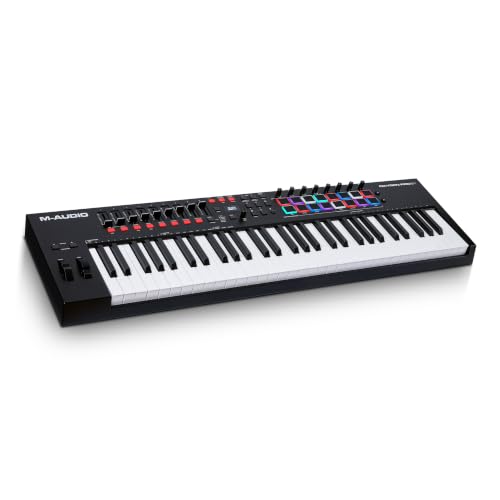
Oxygen Pro 61 emphasizes modern control with 61 velocity-sensitive keys and aftertouch, plus Native Instrument Standard (NKS) integration and bundled Komplete 15 Select options. Best for producers who want strong NI ecosystem integration and easy access to presets. Choose this if you need deeper software integration and bundle value. Caution: for users who do not rely on NI content, the NKS-centric features may be less impactful.
Buying Guide
Key action and feel
Consider whether you prefer fully weighted, semi-weighted, or synth-action keys. Semi-weighted and synth-action options offer lighter playability, which can speed up workflow for beginners. If you plan extensive piano-style playing, test key resistance and travel to assess comfort.
DAW integration and workflow
Check whether the controller provides native scripts or presets for your DAW. Some models offer broad compatibility across Ableton Live, Logic Pro X, FL Studio, and more. Seamless control over transport, mixer, and clip launching can save time during recording and production.
Pads, faders, and wheels
Pads add beatmaking and clip-launch capabilities. Faders and wheels enable real-time mixing and modulation. If you rely on clip-based workflows, prioritize pads and performance controls; otherwise, you may focus on high-quality key actions and transport controls.
Software bundles
Some controllers include software bundles such as Analog Lab, Komplete, or Ableton integration. Evaluate whether the included bundles match your music style and preferred plugins to maximize value.
Portability and build
If you perform live or travel, investigate the unit’s weight, chassis durability, and USB-powered operation. A compact 61-key layout often balances portability with sufficient playing range for most styles.
Connectivity and power
Most 61-key controllers connect via USB, with some offering additional MIDI or sustain pedal inputs. Power-supply requirements vary; USB bus power is common, simplifying setup for portable rigs without a dedicated power brick.
Compatibility limitations to watch
Some controllers emphasize software ecosystems (e.g., NI, Ableton, or Analog Lab). If you use multiple DAWs or rarely align with the bundled software, ensure cross-compatibility and general MIDI functionality remain strong without exclusive dependencies.
FAQ
- What is a 61-key MIDI controller best for? It offers a comfortable playing range for most styles without the bulk of 88-key keyboards, while providing enough keys for expressive performance and complex melodies.
- Do these controllers require drivers? Many models work plug-and-play with no drivers, but some may benefit from or require software scripts or bundles for full DAW integration.
- Are pads important on a 61-key controller? Pads enhance beatmaking, clip launching, and step sequencing. If you mainly play melodies, pads are less critical but can still add versatility.
- Is NKS integration important? NKS helps control Native Instruments presets, which is advantageous if you use NI software extensively. If not, look for broad DAW compatibility and MIDI control instead.
- Should I choose semi-weighted or synth-action keys? Semi-weighted keys are more piano-like and expressive; synth-action keys are lighter and faster for lead lines and rapid playing.
- Can I use these with iOS devices? Some models support iOS devices via adapters; verify compatibility if you plan mobile music production.