Looking for the best 50 inch TV deals? This guide highlights five solid 50″ options that balance picture quality, smart features, and value. Best for streaming enthusiasts, gaming, and everyday viewing, these picks help you compare brightness, upscaling, and app ecosystems at a glance.
| Product | Best For | Why It Stands Out |
|---|---|---|
| Roku 50-Inch Select Series Smart TV | Easy streaming, simple setup | Strong default picture, fast Roku interface, and automatic updates |
| Samsung 50-Inch Class U8000H | Bright, color-accurate 4K | Crystal Processor and upscaling with broad content support |
| Amazon Fire TV Omni 50″ QLED | Integrated Alexa experience | Dolby Vision IQ, HDR10+, ambient features for living room use |
| Westinghouse Roku TV 50″ | Budget-friendly Roku panel | Strong 4K image with robust streaming options |
| Hisense 50″ E6SR Hi-QLED | High-quality color and Dolby Vision | Hi-QLED with AI upscaling and smart home compatibility |
Roku 50-Inch Select Series Smart TV Overview

The Roku Select Series focuses on seamless streaming and a user-friendly experience. It uses a sharp 4K picture with QLED panel benefits and HDR10 to deliver bright, accurate colors. The Roku Smart Picture feature optimizes incoming signals for the right picture mode. This model is best for buyers who want a straightforward smart-TV experience with reliable app access and automatic updates. A potential limitation is that it prioritizes streaming smartly over high-end gaming features or ultra-wide color gamuts.
Best for: Streamers who want a simple setup, quick access to apps, and dependable picture quality without extra gaming bells and whistles. The Roku interface is easy to navigate, and the built-in updates help keep apps current.
Samsung 50-Inch U8000H Class Crystal UHD

Samsung’s Crystal Processor drives vibrant 4K with upscaling that enhances color and clarity. The TV offers extensive streaming content via Samsung TV Plus and smooth motion processing with Motion Xcelerator, making it a strong pick for sports and gaming. This model is best for buyers who value color accuracy and smoother motion, plus an expansive content ecosystem without extra devices. A limitation could be the need to explore multiple apps to maximize all features, as some preferences may lean toward a more premiere gaming-heavy TV.
Best for: Those who want vivid color, strong upscaling, and a broad, subscription-free content library for everyday viewing and casual gaming.
Amazon Fire TV Omni 50″ QLED Series

The Omni QLED TV combines a bright 4K quantum-dot panel with Dolby Vision IQ and HDR10+ Adaptive. Fire TV’s ambient experience and hands-free Alexa support simplify control and content discovery. This option is best for buyers who want deep smart home integration and fast voice control, plus dynamic HDR formats for richer movie scenes. A potential limitation is the reliance on Fire TV’s ecosystem for optimal experience, which may require account setup and ongoing app management.
Best for: Smart-home enthusiasts who want built-in Alexa, Ambient mode options, and vibrant colors for movies and sports.
Westinghouse Roku TV 50 Inch
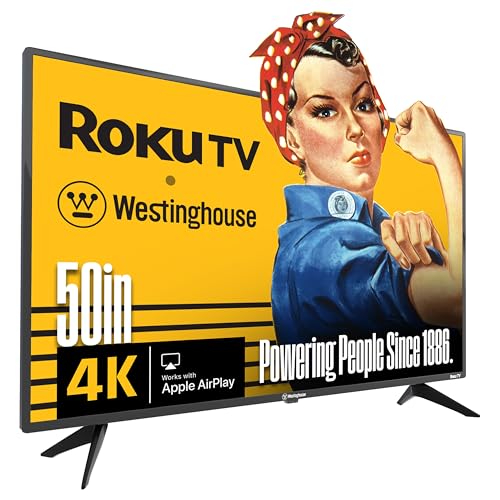
Westinghouse combines a 4K UHD picture with Roku’s streaming interface, offering a broad app lineup at a friendly price point. It is best for budget-conscious buyers who still want robust streaming with a straightforward Roku experience. One caution is that it may not feature the most advanced picture processing compared to higher-end models, so bright room viewing and fast-paced gaming should be considered accordingly.
Best for: Budget-minded shoppers who want a capable 4K Roku TV with easy app access and reliable streaming without extra frills.
Hisense 50″ E6SR Hi-QLED 4K UHD

The Hisense E6SR pairs Hi-QLED color with Dolby Vision and AI upscaling to deliver a vivid, movie-like picture. This model supports voice assistants and smart home integration, making it a strong all-around choice where picture quality and smart features matter. A note: AI upscaling helps older content but may not always replace native 4K content in all scenes. It is best for viewers seeking high color fidelity with advanced processing at a reasonable price.
Best for: Viewers who want cinematic color accuracy and Dolby Vision along with solid upscaling across a diverse content library.
Buying Guide: How To Choose The Right 50-Inch TV
- Screen technology: QLED and Hi-QLED offer brighter colors and better HDR impact than standard LCD. Consider if you value peak brightness for bright rooms or cinematic color depth for dark rooms.
- Picture processing: Look for strong upscaling and motion handling for sports and gaming. A processor that enhances color and detail can improve everyday viewing.
- Smart platform: Consider which app ecosystems you prefer (Roku, Samsung Tizen, Fire TV, etc.). Easy app access and voice control improve daily use.
- HDR formats: Dolby Vision, HDR10, and HDR10+ affect how your content looks. Some models offer adaptive HDR for varying lighting conditions.
- Gaming features: If gaming matters, prioritize low input lag, HDMI 2.1 support, and features like VRR and ALLM.
- Connectivity: Ensure enough HDMI ports, USB options, and wireless features (Wi-Fi, Bluetooth) for soundbars and accessories.
- -room placement: The TV’s size and brightness should complement your room lighting and seating distance for best viewing comfort.
FAQ
- Q: Is a 50-inch TV a good size for a small living room?
- Q: Which 50-inch TV has the best HDR performance?
- Q: Do I need a smart speaker to use these TVs effectively?
- Q: Are 4K upscaling features worth it?
- Q: Which TV is best for gaming on a 50-inch screen?
- Q: Do these TVs support wall mounting?
A: Yes, 50 inches is typically a versatile size for many rooms, offering immersive viewing without overwhelming space. Consider viewing distance and wall space before buying.
A: Models with Dolby Vision and HDR10+ support generally deliver the richest HDR experience. Check the panel type and processor for best results.
A: Not required, but some TVs integrate well with voice assistants (Alexa, Google Assistant) for hands-free control and content search.
A: Yes, upscaling improves older or non-4K content, but results vary by processor and source quality.
A: Look for models with low input lag, VRR, and ALLM. HDMI 2.1 ports support newer consoles for smoother gameplay.
A: Most 50-inch models offer VESA mounting compatibility; check the product specs to confirm compatibility and weight limits.