The best 4G router with a SIM slot provides dependable wireless internet where fixed broadband isn’t available. This guide targets buyers seeking portable or home-use 4G solutions that accept a SIM card, support multiple devices, and offer straightforward setup. The top picks below are suited for remote cabins, temporary offices, backups, or households needing cellular redundancy.
Summary of selected products:
| Product | Brand | Key Benefit | Best For |
|---|---|---|---|
| Cudy 4G Cat 4 AC1200 Wi-Fi 5 Router | Cudy | Dual-Band Wi‑Fi 5 with VPN/WAN failover | Bargain backup internet with secure VPN access |
| GL.iNet GL-X2000 Spitz Plus | GL.iNet | Wi‑Fi 6, dual-SIM, multi-WAN with load balancing | Mobile office or remote site with multiple WAN options |
| Dionlink Dual Band 4G LTE Router | Dionlink | AC1200 speeds with strong 2.4/5 GHz bands | Reliable home network with many devices |
| TUOSHI N300 WiFi 4G LTE Modem Router | TUOSHI | Wide carrier support and extended antennas | Rural or cabin internet where signals are weak |
| KuWFi 4G LTE Router with SIM Slot | KuWFi | Robust external antennas and multiple LAN ports | Stable LAN sharing for small offices or homes |
Note: Each option supports inserting a SIM card for cellular data. Availability and performance depend on your carrier, SIM plan, and signal strength at the installation site.
Cudy 4G Cat 4 AC1200 Wi-Fi 5 Router

Best for budget-minded users who want straightforward cellular backup with VPN options. The Cudy router offers LTE Cat 4 connectivity up to 150 Mbps down and 300 Mbps up, plus dual-band Wi-Fi 5 with beamforming for better coverage. It includes VPN server and client features, as well as automatic WAN failover that switches to cellular if the primary connection drops. This makes it suitable as a secondary home or small office internet source, especially where wired service is unstable.
Who it’s best for: Small homes, cabins, or offices needing reliable VPN-enabled cellular backup on a budget. Caution: Cat 4 speeds may be limiting in busy networks or areas with strong fiber or cable competition.
GL.iNet GL-X2000 Spitz Plus

Best for users requiring fast Wi‑Fi 6 and flexible connectivity. The Spitz Plus supports 4G LTE with CAT 12 and dual-SIM options, plus multi-WAN with load balancing. It is certificated for major carriers and can prioritize failover among Ethernet, cellular, and tethering connections. This model is well-suited for remote workstations, mobile offices, or small businesses needing high-speed cellular access and robust failover capabilities.
Who it’s best for: Tech-savvy buyers needing high-speed cellular as primary or backup internet, with advanced WAN management. Caution: Higher price point and more setup complexity than basic models.
Dionlink Dual Band 4G LTE Router

Best for balanced performance at a mid-range price. The Dionlink router combines AC1200 speeds with 2.4 GHz and 5 GHz bands to support many devices simultaneously and maintain stable connections for streaming and gaming. It is recommended for households or small offices that need dependable wireless coverage across multiple rooms with SIM-based internet. A potential limitation is that real-world speeds depend on carrier plan and signal quality.
Who it’s best for: Homes or small offices with several devices needing reliable wireless access. Caution: Actual speeds may vary by network and carrier constraints.
TUOSHI N300 WiFi Unlocked 4G LTE Modem Router

Best for broad carrier compatibility and coverage expansion. The TUOSHI N300 supports a wide range of LTE bands and includes high-gain antennas to extend signal reach inside larger homes or cabins. It delivers up to 150 Mbps download and 300 Mbps wireless speed, facilitating smooth streaming and gaming when fixed lines are unavailable. This model is a solid choice where long-range Wi‑Fi is important.
Who it’s best for: Users in sparsely connected areas or with older devices that benefit from extended antenna performance. Caution: Some bands may require carrier compatibility checks before purchase.
KuWFi 4G LTE Router With SIM Slot
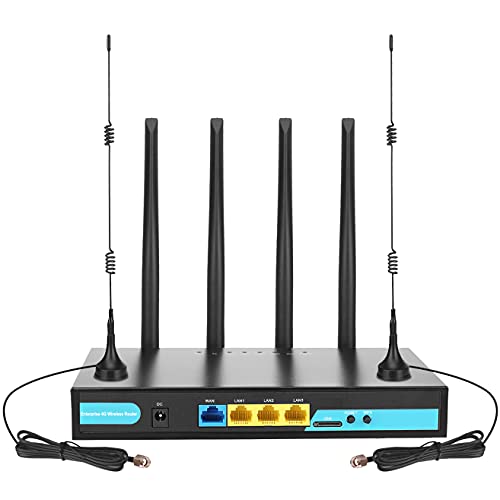
Best for robust hardware with multiple LAN ports. The KuWFi model emphasizes a strong radio with several LAN outlets alongside a WAN port, making it suitable as a small office router or home hub for shared connections. It uses external antennas to maximize signal stability and supports SIM-based internet. A caveat is that its feature set is oriented toward wired network expansion, which may be overkill for single-device setups.
Who it’s best for: Small offices or households that want reliable wired and wireless distribution from a single SIM-based device. Caution: More ports mean more configuration to optimize performance.
Buying Guide: Choosing the Right 4G Router With SIM Slot
- Determine whether you mainly need a backup internet line, or a primary cellular connection. For backup, WAN failover is valuable. For remote work, Wi‑Fi 6 or multiple bands improves performance.
- LTE Cat 4 devices often top out around 150 Mbps down, 300 Mbps up in real-world scenarios. If you anticipate higher speeds, look for LTE Cat 6/12 or Wi‑Fi 6 models like the Spitz Plus.
- Check if the device supports the bands used by your carrier and whether it works with your SIM plan. Some models work only with certain carriers or require specific APN settings.
- Multi-WAN or load balancing helps distribute traffic and maintain uptime if one path fails. Consider Ethernet WAN alongside cellular for flexibility.
- External antennas can improve range in larger homes or rural locations. More antennas and higher gain typically yield better coverage.
- Look for built-in VPN capabilities (WireGuard, IPsec, OpenVPN) and firewall options to protect remote access and devices on the network.
- For non-technical users, prioritize models with straightforward web interfaces or companion apps to simplify setup and monitoring.
FAQ
- Do I need a SIM card to use a 4G router? Yes. A SIM card provides the cellular data connection the router distributes to connected devices.
- Can a 4G router replace fixed broadband? It can in some cases, but speeds depend on signal strength and carrier plans. For essential work, check coverage maps and expected throughput.
- What is WAN failover? It is a feature that automatically switches traffic to a cellular connection if the primary internet path fails, helping maintain online services.
- Are these routers ready for smart homes? Many models can support multiple devices, but performance depends on your home size and Wi‑Fi coverage. Consider routers with strong antenna setups for larger homes.
- Is Wi‑Fi 6 worth it for a 4G router? If you have many devices or a crowded network, Wi‑Fi 6 offers better efficiency and capacity, especially in denser households or small offices.
- Do these devices need warranties? Warranty terms vary by seller and product. Review the listing for any hardware guarantees or return policies before purchasing.