If you’re searching for affordable, feature-rich alternatives to the original PS4 controller, these third-party options offer good grip, reliable wireless or wired connections, and extra comfort for long sessions. This guide highlights five models that suit different players—from casual weekend warriors to competitive multiplayer fans. Each pick includes who it benefits most and why it stands out, plus practical cautions to help you decide.
| Product | Best For | Key Strength |
|---|---|---|
| AceGamer Galaxy Wireless PS4 Controller | Cosmic design lovers; long sessions | Comfortable non-slip grips; 3.5mm audio jack |
| AceGamer 2 Pack PS4 Controllers (Black & White) | Multiplayer households | Two controllers in one package; affordable pair |
| Ubsvaky Wireless PS4 Controller | Budget-conscious players who want modern features | 3.5mm jack, built-in speaker, long battery |
| SZDILONG Wireless PS4 Controller | PC and cross-platform gamers | Six-axis sensor; immersive audio options |
| LZXWAWA Wireless PS4 Controller | Flexible setup across devices | Bluetooth plus wired options; broad compatibility |
AceGamer Galaxy Wireless PS4 Controller

AceGamer Galaxy is designed for PS4/Pro/Slim and Windows PC use. It features a galaxy-inspired shell printed via water transfer, with a smooth finish that aims to resist sweat. This model includes a standard 3.5mm audio jack for headset compatibility and a non-slip grip on both sides for comfortable play during longer sessions. Best for players who want a visually striking controller without sacrificing grip and audio options.
Who it’s best for: gamers who love a bold, space-themed look and want a comfortable, reliable wireless connection. Why selected: the galaxy finish is durable, and the design includes user-friendly grips and a built-in audio jack. Caution: first-time console pairing requires the included USB cable; PC pairing may require holding both Share and Home for a few seconds.
AceGamer 2 Pack PS4 Controllers (Black & White)

This 2-pack bundle suits households or friends who want to play together with matching or complementary designs. It supports PS4/Pro/Slim and PC via Bluetooth after the initial USB pairing. The package emphasizes two controllers with ergonomic grips, refined analog sticks, and dual-motor vibration for a responsive feel. Best for families or roommates who value value and ease of setup.
Who it’s best for: households seeking two dependable controllers at once. Why selected: cost-effectiveness and the convenience of having identical or contrasting styles in one purchase. Caution: PC users (without Bluetooth) may need a separate receiver for full PC compatibility; first-time connection requires USB cable.
Ubsvaky Wireless PS4 Controller

Ubsvaky’s Black PS4 controller emphasizes a high-quality finish with non-slip edging and a long-lasting 1000mAh battery. It supports a 3.5mm head phone jack, built-in speaker, and a Type-C charging cable. Best for players who want strong battery life and a comfortable grip without breaking the bank. Caution: claims a long wireless range, but actual performance can vary by environment; ensure proper pairing with your PS4 or PC.
LZXWAWA Wireless PS4 Controller
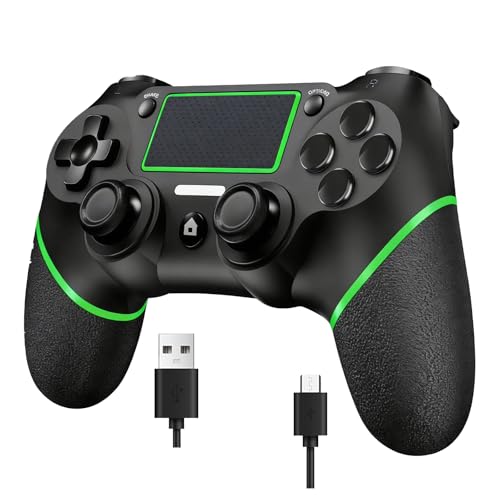
LZXWAWA offers both Bluetooth and wired connection options, letting you switch between PC and PS4 with ease. The controller supports a broad range of devices and a 3.5mm audio jack for headsets. Best for players who want flexibility to work across platforms and a simple pairing process. Caution: some users may need a separate Bluetooth receiver for PC use, as noted in the product description.
SZYUYU Wireless PS4 Controller

SZYUYU focuses on ergonomic design with upgraded controls, offering compatibility with PS4/Pro/Slim and Windows PC through Bluetooth. It includes a modern outer shape, improved trigger responsiveness, and a dual-analog setup. Best for gamers who want an ergonomic feel with improved shoulder button action. Caution: as a third-party device, performance can vary by batch; ensure you follow pairing instructions for PC use.
Buying Guide
What should you consider when choosing a 3rd party PS4 controller?
- Platform compatibility: Most options support PS4 consoles and Windows PCs, with some offering broad device support beyond PS4. If you also use a PC, check for Bluetooth or Receiver requirements.
- Pairing method: Some controllers require initial USB pairing before wireless use. If you switch between PC and PS4, confirm whether a USB cable is needed for first connection.
- Control layout and ergonomics: Look for non-slip grips, responsive triggers, and comfortable thumbsticks for long sessions. Consider the weight and balance of the controller.
- Audio and feedback features: A 3.5mm headphone jack and built-in speaker or vibration motors enhance immersion. If you use headsets, verify the audio options.
- Battery life and charging: For wireless models, battery capacity and charging time matter. Some use USB-C for faster charging and longer playtime.
- Design and aesthetics: If you care about appearance, options with themed shells or color schemes may influence choice, provided grip and comfort remain solid.
Frequently Asked Questions
- Are third-party PS4 controllers compatible with PS4 Pro and PS4 Slim? Yes, most third-party controllers are designed to work with PS4 family consoles, including Pro and Slim models.
- Do these controllers require software or drivers on PC? Some models may require drivers or a receiver for PC use, especially when Bluetooth is not available. Check the product notes for PC requirements.
- Can I use a 3.5mm headset with these controllers? Most listed controllers include a 3.5mm audio jack for headset compatibility.
- Is pairing by USB cable always necessary for the first connection? Many models advise a one-time USB pairing to enable wireless Bluetooth, after which USB may not be needed.
- Will these controllers have the same button layout as Sony’s DualShock 4? In most cases, third-party controllers replicate the basic layout (D-pad, thumbsticks, Share/Options, and touchpad), though some button shapes may differ slightly.
- Do these controllers affect game performance or latency? Latency varies by model and environment; look for models that advertise low-latency or stable Bluetooth connections for smoother gameplay.