Answering the needs of tabletop gamers and model builders, these 3D printers are selected for precision, reliability, and ease of use when creating miniatures. Resin printers tend to excel at fine detail for small figures, while compact FDM options suit quick prototypes and larger figurines. The list below highlights 5 printers well-suited for high-detail miniature work, across budget and experience levels. Buyers can expect sharp edges, smooth surfaces, and accurate scaling with the right post-processing. The table summarizes each option at a glance.
| Printer | Best For | Build Type | Key Strength |
|---|---|---|---|
| ANYCUBIC Photon Mono 4 | Detail-oriented miniatures | Resin | Ultra-high 10K resolution, fast printing |
| ELEGOO Mars 5 | Beginner to intermediate resin prints | Resin | Automatic leveling, smart safety features |
| Bambu Lab A1 mini | Easy setup with automatic calibration | FDM | Quiet, auto-calibration, ecosystem |
| ELEGOO Saturn 4 Ultra | Large miniatures or batches | Resin | 16K resolution, large printing area |
| FLASHFORGE Adventurer 5M Pro | High-speed, precise prototyping | FDM | 1-click auto leveling, multi-nozzle options |
ANYCUBIC Photon Mono 4: High-Detail Resin Printer

The Photon Mono 4 is a resin printer designed for miniatures with a 7-inch 10K mono LCD and a 17×17 μm pixel size on the X and Y axes. This level of resolution supports fine lines and subtle textures in small figures, which helps models stand out on the tabletop. The LighTurbo light source provides stable illumination to minimize layer lines and maintain surface smoothness. Its build volume, up to 6.04” x 3.42” x 6.49”, is ample for multiple minis in a single print run.
Best for: detail-focused hobbyists who want high fidelity in small figures. It’s particularly suitable for scalable models with dynamic features like delicate armor, facial features, and fine armor detailing. A limitation to note is resin handling and post-processing requirements, including washing and curing steps outside of printing. This type of printer benefits from a well-ventilated workspace and a dedicated post-processing station.
Why selected: The combination of 10K resolution and a fast mono LCD makes it a strong contender for producing crisp miniatures with reduced visible layer lines. It’s well-suited for annual miniature casts and high-detail busts or displays, where accurate line work matters.
FLASHFORGE Adventurer 5M: Auto-Leveling Resin Ready

The Adventurer 5M is a resin-capable printer with a fully automatic leveling system and high-speed capability. It features a direct-extruder option and a CoreXY all-metal frame, designed to handle precise prints and provide reliable first layers. It’s a practical choice for miniatures where consistent placement and surface finish are critical. A potential constraint is the need to manage resin handling and post-curing steps, which can add time to the overall workflow.
Best for: users who want a print workflow with minimal manual bed leveling and a faster path to finished minis. Choose this if your routine involves batch-printing several figures in one session. Avoid this if you prefer purely solvent-free processes or limited post-processing control.
ELEGOO Mars 5: 4K Mono LCD Resin Printer

The Mars 5 resin printer offers one-click automatic leveling and smart safety features like residue detection to protect the LCD from resin damage. Its automated checks help ensure reliable prints, reducing waste and downtime. The 4K mono LCD yields crisp layer details, suitable for small figurines and finely sculpted minis. It’s a practical choice for hobbyists who want straightforward operation with dependable results. A limitation is that resin curing and cleanup remain necessary outside the print process.
Best for: beginner to mid-level resin hobbyists who value ease of setup and consistent first layers. Choose this if you want a safer, guided printing experience with fewer calibration hassles. Consider this alternative if you need larger build volumes than 6 inches tall minis typically require.
Bambu Lab A1 mini: Quiet, Auto-Calibrating FDM Printer
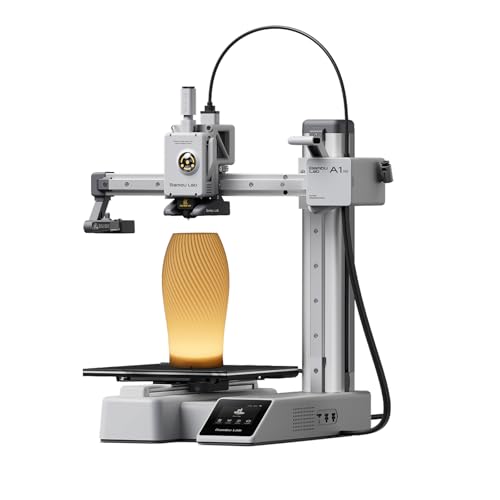
The A1 mini is an all-in-one solution for beginners and casual makers seeking an easy setup. It features automatic calibration and active flow rate compensation, delivering reliable, quiet operation (≤48 dB). The included LED lamp kit expands creative possibilities beyond standard prints. This printer is well-suited for hobbyists who want a polished out-of-the-box experience and a connected ecosystem via MakerWorld and the app. A practical caveat is that high precision plastics and oils may require careful maintenance to keep the auto-calibration accurate over time.
Best for: beginners or hobbyists who want a straightforward, tidy workflow with minimal manual tuning. Choose this if you value a modern ecosystem and quiet operation. Avoid if you need the largest build volume or if you require heavy-duty industrial-grade support.
FLASHFORGE AD5X Multi-Color 3D Printer

The AD5X brings multi-color printing to the forefront with support for up to four colors, enabling vibrant minis and mixed-material projects. It uses a CoreXY architecture with fast 600 mm/s printing speeds and a robust 1-Click Auto Leveling system. The 220x220x220 mm build area accommodates reasonably sized figurines, while the multi-nozzle capability adds versatility for color detail. A limitation is the additional complexity that color management can introduce to the workflow for novice users.
Best for: color-conscious miniatures and rapid prototyping where vibrancy matters. Choose this if you want to explore color workflows and multi-material possibilities. Avoid if you are primarily printing single-color minis or if you prefer a simpler single-nozzle setup.
Buying Guide: What To Consider When Choosing A Miniatures Printer
- Print Type: Resin printers excel at tiny, high-detail minis; FDM printers are better for larger figures and faster prototypes. Consider resin for display-quality minis and FDM for durable gaming pieces.
- Resolution and Detail: Look for 4K/8K or 10K LCDs for finer features. Smaller XY pixel sizes yield crisper edges on miniatures.
- Build Volume: Ensure the printer can accommodate your typical miniature size and batch sizes. Larger prints can save time but require more space.
- Ease of Use: Automatic bed leveling, resin safety features, and an intuitive UI reduce setup time. Ecosystem support can streamline model sharing and updates.
- Post-Processing: Resin prints require washing and curing; factor in space and time for post-processing. FDM prints generally need support removal and sanding.
- Maintenance: Consider ongoing calibration needs, nozzle replacements, resin handling, and cleaning routines to maintain print quality.
- Noise and Footprint: If space or quiet operation matters, prefer models with quiet fans and compact designs.
Common Questions About Miniature 3D Printing
- Q: Which printer is best for tiny, highly detailed minis? A: Resin printers with high-resolution LCDs, such as 10K mono screens, are typically best for ultra-fine detail.
- Q: Do I need post-processing for resin minis? A: Yes. Most resin prints require washing and curing to achieve full strength and stability.
- Q: Is auto-leveling important for beginners? A: Yes. Auto-leveling reduces manual calibration and helps achieve consistent first layers.
- Q: Can I print in multiple colors with these printers? A: Some printers offer multi-color or multi-material capabilities, such as the AD5X. Most resin printers are single-color per print.
- Q: Which printer is best for beginners on a budget? A: A compact resin or entry-level FDM printer with automatic leveling and straightforward workflows is ideal for new users.
- Q: What maintenance should I plan for long-term use? A: Regular nozzle checks for FDM, resin handling safety, and routine cleaning of the build plate and film are recommended.
FAQ Quick Answers
- What is the main difference between resin and FDM for miniatures? Resin offers finer details; FDM is typically faster and more durable for larger pieces.
- Do all resin printers require post-curing? Yes, most resin models require curing after washing to achieve full strength.
- Is auto leveling necessary for good first layers? It helps ensure consistent adhesion, especially for beginners.
- Are large build volumes better for minis? Not always; many players prefer higher detail in smaller prints, which resin can provide.