The top picks below are aimed at new users and families seeking straightforward setup, reliable results, and beginner-friendly features. Each option is evaluated for ease of use, common beginner pain points, and practical limitations. This guide helps you decide which printer fits your needs—whether you want fast, high-volume prototyping, or simple, quiet, home-use printing. The buyer types addressed include absolutely new hobbyists, students, and casual makers exploring creative projects at home or in classrooms.
Summary of selected products:
- FLASHFORGE Adventurer 5M: Auto-leveling, high-speed CoreXY, versatile nozzle for rapid prototypes.
- ANYCUBIC Photon Mono 4: Resin printing with high detail for miniatures and models.
- Entina Tina2C: Fully assembled, beginner-friendly with app control and a large model library.
- Portable 3D Printer (Generic): Compact, simple setup, beginner-friendly with guided tutorials.
- Bambu Lab A1 mini with LED Kit: Beginner-friendly, auto calibration, ecosystem access.
FLASHFORGE Adventurer 5M 3D Printer With Auto Leveling

The Adventurer 5M targets beginners who want hassle-free setup and fast, reliable prints. Its one-click automatic bed leveling eliminates manual leveling and reduces failed first layers, making it ideal for classrooms or family projects where consistency matters. The CoreXY all-metal structure supports higher speed printing, up to 600 mm/s travel speed, which helps with quick iterations during prototyping. For new users, the 3S detachable nozzle and quick-warm options further simplify maintenance and operation, letting hobbyists focus on design rather than calibration.
Best for: Beginners who want a fast, low-friction entry into 3D printing with dependable first-layer results and fewer manual adjustments. It’s particularly suitable for students, makers, and families who run frequent quick-turn projects and prototyping tasks.
Limitations to note: While high-speed capability is impressive, long prints may still benefit from stable ambient conditions and careful part cooling planning to sustain quality at top speeds.
ANYCUBIC Photon Mono 4 Resin 3D Printer

The Photon Mono 4 is oriented toward users who need fine detail and smooth surface finishes, such as model makers, miniatures, and jewelry enthusiasts. With a 7-inch 10K monochrome LCD, it delivers higher resolution and faster layer exposure, enabling more precise details per layer. The LighTurbo light source promotes stable, uniform curing, which reduces visible layer lines and enhances finish quality. The printer’s moderate build volume suits small, highly detailed parts, and the 70 mm/h print speed (typical for resin printers) balances detail with efficient production.
Best for: Beginners who want highly detailed prints and are comfortable with resin post-processing. Choose this for accurate miniatures, highly detailed prototypes, or components requiring smooth, intricate surfaces.
Caution: Resin printers involve handling liquids and post-processing steps; appropriate safety measures and ventilation are advised. Resin waste should be disposed of following local regulations.
Entina Tina2C 3D Printer For Kids & Beginners

The Tina2C is designed for absolute beginners and younger users, emphasizing a simple start. It features fully assembled setup, quick 8-minute start from unboxing, and app-based control via Poloprint Cloud. Its 20+ DIY modules and a 3,000-model library support ongoing learning and exploration, making it well suited for classrooms, family projects, and intro-level STEM activities. The device also enables WiFi and offline printing, which accommodates varied usage patterns from cloud-based to local slicing and printing.
Best for: Families and classrooms seeking a turnkey, kid-friendly experience with educational content and flexible printing options. This model suits beginning artists, hobbyists, and students exploring STEM concepts in a home or school setting.
Limitation: The breadth of features can become overwhelming for very new users who prefer a minimal, single-app workflow; consider a simpler model if you want a fewer-step experience at first.
Portable 3D Printer – Compact Beginner FDM

This portable, compact FDM printer targets users who want a lightweight, space-saving option with minimal setup. It includes a removable build plate and supports PLA and TPU filaments, expanding material versatility for simple toys, small home decor, and basic parts. The included quick-start video guides and modular assembly help first-time users move from unboxing to printing quickly. The device favors beginners who need a straightforward, all-in-one package for occasional prints and easy tinkering.
Best for: Absolute beginners who want a compact, easy-to-transport device for simple projects and quick-start learning. It’s also a good test run before investing in a larger, more feature-rich machine.
Caution: Smaller build volume may limit larger projects; ensure your ideas fit within the 100x100x100 mm space.
Bambu Lab A1 Mini With LED Lamp Kit
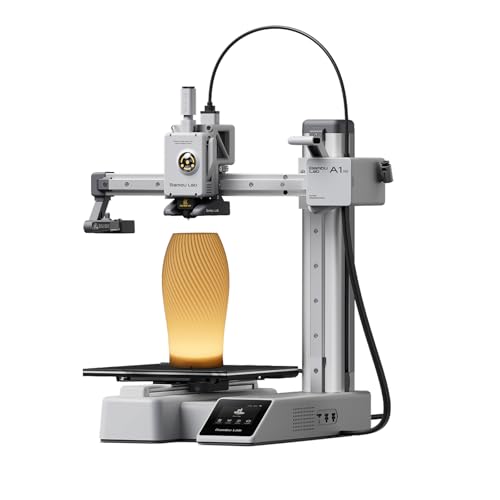
The A1 mini combines beginner-friendly calibration with a broader ecosystem. It offers automatic calibration, a quiet operation profile, and active flow rate compensation for stable prints. The inclusion of an LED lamp kit enables creative lighting projects alongside standard prints, expanding educational and decorative possibilities. Makers can leverage MakerWorld’s model library and the Bambu Handy app for print management, enabling a connected, streamlined workflow for new users.
Best for: Beginners who want a quick, guided setup with strong software support and additional creative possibilities via the LED kit. It suits those who value ecosystem connectivity and ongoing model resources.
Limitation: The feature-rich environment may require periodic software updates; plan for occasional app or firmware maintenance for optimal performance.
Buying Guide
What should beginners consider when choosing a 3D printer?
- Ease of setup: Look for models with automatic bed leveling, simple calibration, and guided onboarding to minimize frustration.
- Print technology: FDM is beginner-friendly and versatile for general tasks; resin printers offer high detail but demand more post-processing and safety steps.
- Build volume: Start with modest sizes (100x100x100 mm to 220x220x220 mm) to handle a broad range of projects without overwhelming space or cost.
- Materials supported: PLA is the easiest for beginners; TPU and other flexible materials require more tuning and care.
- Software and ecosystem: Apps and cloud libraries help with model selection, model management, and friendly workflows for new users.
- Maintenance and reliability: All-metal frames and quality components reduce downtime, but consider availability of spare parts and community support.
- Safety and handling: Resin printers require ventilated spaces and proper resin handling; UV exposure and fumes should be managed safely.
FAQ
- Q: Which printer is best for a true beginner with no experience?
A: A model with auto-leveling, easy setup, and strong beginner support (like the Adventurer 5M) is ideal for first-time users. - Q: Is resin printing worth it for beginners?
A: Resin printing offers higher detail but requires post-processing and safety precautions. It suits users needing precise miniatures or highly finished parts. - Q: Should I start with a small or large build volume?
A: A modest build volume reduces print failures and space needs while still supporting a wide variety of beginner projects. - Q: What maintenance should I expect?
A: Regular bed leveling checks, nozzle maintenance, filament loading, and occasional software updates are typical. choose models with easy access for quick maintenance. - Q: Are there budget concerns for beginners?
A: Yes. Budget-conscious models with strong beginner features, reliable customer support, and a growing ecosystem offer the best long-term value. - Q: How important is online support and model libraries?
A: Very important for beginners. Ready-to-print models and helpful tutorials accelerate learning and reduce trial-and-error printing.