Looking for a dependable 32GB USB flash drive to store photos, documents, or media? This guide covers five solid options, comparing speed, durability, and ease of use to match common needs—from casual everyday use to light business use. The top picks include packs for bulk use, swivel designs for portability, and drives with password protection. The buyer profile below helps you choose the right one based on lifetime, capacity, and convenience.
| Product | Brand | Capacity | Why It Stands Out |
|---|---|---|---|
| SamData 32GB USB Flash Drives 2 Pack | SamData | 32GB each | Color options and plug-and-play simplicity |
| MECHEER 32GB 10 Pack | MECHEER | 32GB each | Bulk value with lanyards and swivel cap |
| PNY Turbo Attaché 3 USB 3.0 5-Pack | PNY | 32GB each | High-speed USB 3.0 performance |
| SanDisk Ultra 32GB USB 3.0 | SanDisk | 32GB | Fast transfer speeds and security options |
| SanDisk Cruzer Blade 32GB USB 2.0 | SanDisk | 32GB | Ultra-compact, simple file sharing |
SamData 32GB USB Flash Drives 2 Pack

Best for: Everyday riders who want two color-coded drives for organizing different content. This pack includes two 32GB USB 2.0 drives with a capless, 360-degree rotating metal clip that protects the port. Plug-and-play use makes it ideal for quick transfers between home or office computers.
Why selected: The dual-color option helps separate personal and work data, while the LED indicator provides a quick transfer status check. It’s simple to use and supports common Windows, Linux, and Mac OS versions without software installation.
Caution: USB 2.0 speeds are slower than USB 3.x drives, which may affect large file transfers. Not ideal for very large media libraries that require high-speed throughput.
MECHEER 32GB 10 Pack

Best for: Bulk users needing uniform drives for events, offices, or classroom distribution. The set includes 10 color-varied drives with a 360-degree swivel cap for port protection and easy carrying with detachable lanyards.
Why selected: The combination of portability, included lanyards, and rugged aluminum casing provides a balance of durability and convenience for high-volume use.
Caution: While USB 2.0 compatibility is broad, the drives may underperform for high-speed tasks on modern devices that support USB 3.x.
PNY Turbo Attaché 3 USB 3.0 5-Pack

Best for: Users who transfer large files often and want speed advantages of USB 3.0. The Turbo Attaché 3 provides faster-than-USB-2.0 performance suitable for media and large documents.
Why selected: High-speed transfer capability (USB 3.0) makes it a strong choice for practical daily use where time matters, such as editing projects or moving big video files.
Caution: As a multi-pack, ensure you label drives to avoid cross-content mixups in shared environments.
SanDisk Ultra 32GB USB 3.0

Best for: People needing fast transfers with broad compatibility. The SanDisk Ultra line is known for solid USB 3.0 speeds and reliable performance across devices.
Why selected: It combines fast USB 3.0 speeds with easy plug-and-play use, suitable for everyday backups, media transfers, and school or work tasks.
Caution: While it offers robust transfer speeds, ensure you use proper encryption if sensitive data is stored on the drive.
SanDisk Cruzer Blade 32GB USB 2.0
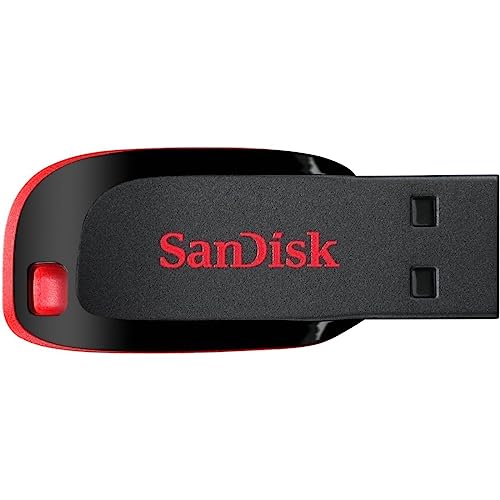
Best for: Budget-conscious buyers who need portable storage at a low cost. This drive offers compact design and straightforward file transfer between computers.
Why selected: The ultra-compact form factor makes it easy to carry in a pocket or on a keychain, which is ideal for light daily use and quick transfers.
Caution: USB 2.0 speeds are slower; avoid for large media projects or time-sensitive tasks.
Buying Guide
- Speed and USB Version: USB 3.0/3.2 drives offer faster read/write speeds than USB 2.0. If you frequently move large files, prioritize USB 3.x models like the PNY Turbo Attaché or SanDisk Ultra.
- Capacity and Future Use: 32GB is suitable for documents, photos, and smaller media. For bigger libraries, consider higher-capacity drives or packs that offer consistent performance across units.
- Durability and Design: Swivel caps and metal casings protect the USB connector in daily carry. If you travel often, look for protective features and lanyard options like MECHEER’s pack.
- Compatibility: Most drives support Windows, macOS, and Linux. Check for software-free, plug-and-play operation for quick setup without extra steps.
- Security Needs: Some SanDisk models include encryption features. If security is critical, confirm available protections and software requirements before purchase.
- Value and Use Case: For bulk distribution to teams or students, consider multi-pack options. For personal use, single drives with strong durability may suffice.
Frequently Asked Questions
What is the practical use of a 32GB USB flash drive?
It’s suitable for storing documents, photos, and smaller media files, and for quick transfers between devices without the internet.
Is USB 3.0 significantly faster than USB 2.0 for all files?
Yes, USB 3.0 typically offers faster read/write speeds, especially with larger files, compared with USB 2.0.
Do 32GB drives come with encryption?
Some models offer encryption software; check product details to confirm if security features are included and how to enable them.
Are bulk packs worth it for classrooms or offices?
Bulk packs provide cost efficiency and standardized drives, making them convenient for distribution and labeling in group settings.
Can I use these drives with a car stereo or older laptops?
Yes, many drives support older USB ports, but performance will align with the USB version and device capabilities.