Looking for a versatile 2-in-1 laptop that balances performance, portability, and affordability? This guide highlights five Amazon-listed models that fit typical buyer needs—students, remote workers, and casual users. Each product section explains who it’s best for, why it was chosen, and any notable limitations to consider. A quick buying guide and FAQ follow to help you compare key factors like performance, battery life, screen quality, and storage.
Product Comparison Snapshot
| Product | Screen | CPU | RAM | Storage | Best For |
|---|---|---|---|---|---|
| HP 14 2-in-1 Chromebook | 14″ FHD IPS | Intel N100 | 4GB | 64GB | Entry-level daily tasks |
| Lenovo IdeaPad Flex 3i Chromebook | 12.2″ FHD IPS | Intel N100 | 4GB | 128GB | Budget-friendly multitasking |
| Tylvx 15.6″ 2-in-1 | 15.6″ FHD | Intel m3-8100Y | 16GB | 512GB | Creative work and multitasking |
| Dell Latitude 3190 11.6″ 2-in-1 | 11.6″ HD | Intel Celeron N5030 | 8GB | 128GB | Education and basic productivity |
| Lenovo Chromebook 2-in-1 | 14″ WUXGA IPS | Intel Core (Gemini) | 4GB | 128GB | Flexible Chrome OS work |
HP 14 2-in-1 Chromebook 14in FHD Touch, N100

This Chromebook is best for students and light commuters who need a compact, affordable 2-in-1 with a responsive touchscreen. The 14-inch FHD IPS display and 360-degree hinge support flexible use in class or on the go. The Intel N100 4-core processor handles browsing, documents, and video calls, while 4GB RAM and 64GB storage keep the system fast for everyday tasks. A potential limitation is limited local storage, which can be mitigated with cloud storage or a microSD card.
Lenovo IdeaPad Flex 3i Chromebook 12.2″ 2-in-1
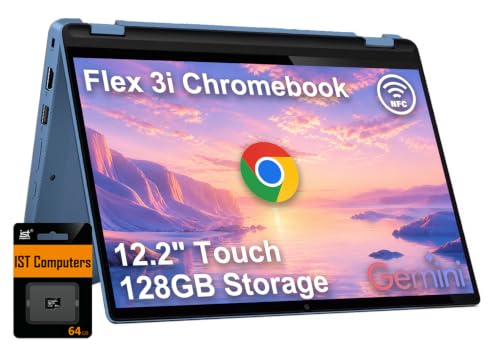
Best for budget-conscious buyers who want more portable screen real estate. The 12.2″ WUXGA IPS touchscreen supports comfortable viewing in classroom or travel settings. It uses the Intel N100 processor with integrated UHD graphics and 4GB RAM, paired with 128GB storage split across eMMC and an SD solution. This model shines in everyday web tasks, notes, and streaming, but the smaller display and Chrome OS limitations may deter power users who rely on specialized software.
Tylvx 15.6″ 2-in-1 Laptop/Tablet

Best for students or creators who want higher RAM and storage. The 15.6″ FHD touchscreen plus 16GB RAM and 512GB SSD provide solid multitasking and local file capacity. The 360° hinge supports laptop, tablet, tent, and stand modes for diverse tasks like note-taking, drawing, or media consumption. The Intel m3-8100Y offers steady performance for everyday productivity, but the device may be heavier than smaller Chromebooks, affecting portability.
Dell Latitude 3190 11.6″ 2-in-1 (Renewed)

Best for education-focused buyers who want a compact, durable device for coursework and basic productivity. This 11.6-inch 2-in-1 provides an 8GB RAM setup and 128GB SSD on Windows 11 Professional, offering familiar software compatibility and multitasking capability. A caution: being a renewed unit, performance and battery life can vary; verify condition and battery test results before purchase.
Lenovo Chromebook 2-in-1 with Gemini, 14″
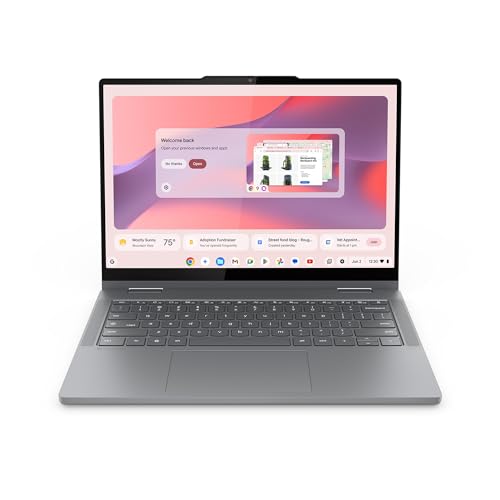
Best for hybrid learners who value a flexible Chrome OS experience. The 14″ WUXGA IPS touchscreen offers clear visuals, and the Gemini processor aims at balanced performance for web apps and lightweight software. Storage is 128GB with LPDDR4 RAM, which is adequate for documents and media. Note that Chrome OS relies on cloud storage for large files, which is a design choice rather than a limitation.
Buying Guide: Key Purchase Considerations
- Operating System: Chrome OS favors cloud-centric tasks, fast boot times, and simple maintenance. Windows 11 Pro supports broader software compatibility for productivity and specialized apps.
- Display and Size: A larger screen benefits multitasking and media, while smaller displays improve portability and battery efficiency. Touchscreen capability adds note-taking and drawing flexibility.
- Processor and RAM: For light tasks, Intel N100 or Celeron suffices. If multitasking or creative work is common, prioritize 8GB+ RAM and a capable CPU to avoid slowdowns.
- Storage: 128GB or more is preferable for offline files and apps. Consider devices with expandable storage via SD cards if you anticipate larger needs.
- Battery Life: Look for models with all-day usage claims, especially for students and remote workers who travel or study away from power outlets.
- Portability: Weighs and dimensions matter for backpack use and commuting. A 2-in-1’s hinge flexibility adds value but can affect overall thickness and weight.
- Durability and Build: For students and active users, a sturdy chassis and reliable keyboard improve long-term usability. Some models emphasize durability in their design language.
FAQ
- What is a 2-in-1 laptop best used for?
They are ideal for users who need both keyboard productivity and touch/tablet convenience, such as note-taking in class, presenting content, or watching media between tasks.
- Is a Chrome OS device suitable for college coursework?
Yes, for browsing, document editing, lectures, and cloud-based work. Some courses requiring specialized software might prefer Windows or macOS.
- Should I choose more RAM or more storage?
RAM improves multitasking and app responsiveness; storage affects how much offline data you can keep. Aim for at least 8GB RAM on heavier use and 128GB storage if offline work is frequent.
- Are renewed or refurbished models reliable?
Renewed devices can offer good value, but verify warranty terms and battery condition. Check return options and confirm device years and repairs if disclosed.
- What screen size is best for portability?
Under 13 inches is typically the most portable; 12 to 14 inches balance readability with transport ease. Larger displays around 15 inches suit in-depth editing or media tasks.
- Do 2-in-1 laptops need special care for the hinge?
Regular use is fine, but avoid forcing the hinge beyond its designed range. Some models include hinge-design improvements for long-term durability.