Looking for a 1440p monitor with a fast 144Hz refresh rate? This guide highlights five top choices that balance sharp image quality, responsive performance, and value. Best for competitive gamers, creators, and multitaskers who want smooth visuals without sacrificing detail. The following selections emphasize strong color, solid build, and practical features like Adaptive Sync and adjustable stands. Use the quick reference table to compare key specs at a glance.
| Product | Brand | Resolution | Refresh Rate | Type |
|---|---|---|---|---|
| Samsung 27″ Odyssey G5 (G51F) | Samsung | 2560 x 1440 | 180Hz | Gaming HDR |
| MSI PRO MP273Q E14 | MSI | 2560 x 1440 | 144Hz | IPS Gaming |
| Dell 27 Plus S2725DSM | Dell | 2560 x 1440 | 144Hz | IPS, Speakers |
| KTC 27 Inch H27T27S | KTC | 2560 x 1440 | 144Hz | G-SYNC/FreeSync |
| Acer KG271U (XE) | Acer | 2560 x 1440 | 180Hz | IPS Gaming |
Samsung Odyssey G5 27″ QHD 180Hz

Best for fast-paced shooters and competitive gamers who want ultra-smooth motion with high pixel density. The QHD 2560×1440 panel delivers sharp scenes, while HDR10 adds brighter highlights and deeper shadows for realism. A 180Hz refresh rate and 1ms response time reduce input lag and motion blur for quicker reactions in games. Consider this if you prioritize fluid gameplay and vivid visuals in one package. Caution: higher-end motion may be less forgiving on non-gaming tasks due to aggressive pixel response handling.
MSI PRO MP273Q E14 27″ QHD IPS, 144Hz

Best for creators and productivity users who want wide viewing angles and color accuracy in QHD. The 27″ IPS panel offers 178° viewing angles with strong color coverage, while TÜV Rheinland Flicker Free and Low Blue Light minimize eye strain. The 144Hz refresh rate keeps motion smooth in gaming as well as fast-paced tasks. Choose this if you value image clarity across content but be mindful of potential color shifts on very dark scenes in some environments.
Dell 27 Plus S2725DSM QHD 144Hz

Best for multimedia and work scenarios needing built-in speakers and strong color depth. The QHD resolution with a 1500:1 contrast ratio yields depth and sharpness, and the 144Hz refresh rate keeps motion fluid. Integrated dual 3W speakers provide basic audio without external gear. Best for desks where space and audio convenience matter; note that some users may prefer higher peak brightness for bright rooms.
KTC 27 Inch H27T27S QHD, 144Hz
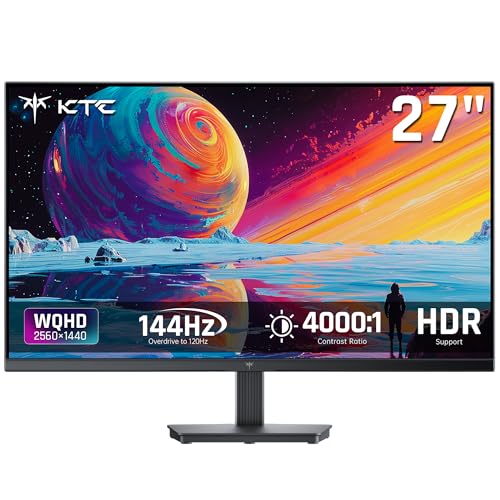
Best for adaptable setups with strong contrast and tear-free gaming. This KTC model uses an HVA panel with a 4000:1 native contrast, enabling deep blacks and bright highlights. 144Hz with Adaptive Sync reduces stutter on compatible GPUs. The frameless design and VESA mount support suit space-conscious desks. Caution: color accuracy may vary slightly out of the box; calibration could improve results for professional tasks.
Acer KG271U 27″ IPS 180Hz

Best for fast action and clarity with versatile inputs. The 27″ IPS panel delivers sharp QHD imagery with up to 180Hz for smoother motion, supported by Adaptive Sync. Suitable for competitive gaming and daily tasks that require color accuracy. Potential limitation: HDR performance is not specified and may be modest on this model, so HDR enthusiasts should temper expectations.
Buying Guide
- Panel type and viewing angle: IPS panels offer wide viewing angles and accurate colors; VA panels can provide higher contrast but may have slightly slower response.
- Refresh rate and response: 144Hz is common; higher rates (up to 180Hz) offer smoother motion in fast games. Consider 1ms or MPRT where motion clarity matters.
- Adaptive Sync: Look for FreeSync or G-SYNC compatibility to reduce tearing. Ensure your GPU supports the corresponding standard.
- Resolution and size: 27 inches at 1440p balances sharpness with legibility. Larger screens benefit from lower dot pitch but require more desk space.
- Ergonomics: Check tilt, height adjustment, pivot, and VESA compatibility for a comfortable setup during long sessions.
- Built-in features: Speakers, USB hubs, and blue-light filtration can add convenience but aren’t essential for all buyers.
FAQ
- What does 1440p mean for gaming? It provides sharper images than 1080p, improving detail without requiring the most powerful GPUs.
- Is 180Hz better than 144Hz? Yes for very fast-paced titles; the difference is most noticeable in competitive FPS games.
- Do I need G-SYNC or FreeSync? Choose based on your GPU: NVIDIA GPUs pair with G-SYNC or Adaptive Sync, and AMD GPUs pair with FreeSync.
- Can I use a 1440p monitor for productivity? Absolutely. The extra pixel density improves text clarity and workspace real estate.
- What is response time in gaming monitors? It’s the time it takes for a pixel to change color; lower times reduce motion blur in fast scenes.
- Are built-in speakers worth it? They’re convenient for quick setups, but dedicated speakers or headphones typically offer better audio quality.