The best 13 inch ultrabook balances portability with solid performance for everyday work, light creative tasks, and travel-friendly computing. This guide highlights five compact laptops ideal for on-the-go professionals, students, and curbside multitaskers. Each pick is evaluated for portability, display quality, keyboard comfort, and upgrade potential. Read on to find the right fit whether you prioritize battery life, processing power, or a flexible 2-in-1 design.
| Product | Why It’s Noteworthy |
|---|---|
| MSI Modern 13 inch Ultrabook | Strong integrated AI features and generous RAM/SSD for multitasking |
| Dell Latitude 7000 7300 | Business-class reliability with solid performance and security |
| MARGOLAI 2-in-1 13″ | 2-in-1 versatility with 3:2 display and fast storage |
| Lenovo ThinkPad X1 Nano Gen1 | Ultra-light chassis with capable Core i7 and strong sustained performance |
| Apple MacBook Air (Renewed, 13″) | Iconic Retina display, efficiency, and a long-standing ecosystem |
MSI Modern 13 Inch Ultrabook

Best for multitaskers who rely on ample memory and fast storage. The MSI Modern 13-inch Ultrabook provides 16GB of RAM and 1TB SSD, enabling smooth multi-tab workflows, data-heavy apps, and quick boot times. It’s powered by an Intel Core 7 processor with AI-powered features to optimize performance during demanding tasks. Ideal for students and professionals who need a compact machine with a spacious internal drive.
Best for: professionals handling large documents, developers, and creatives who need responsive performance in a portable form factor.
Caution: Performance claims depend on the specific model configuration; ensure the exact CPU generation and thermal design meet your workload expectations.
Dell Latitude 7000 7300 (13.3″)

Best for business-focused users who need reliability and robust connectivity. The Latitude 7300 combines a 13.3″ FHD display with an 8th-generation Core i7 performance profile and 16GB RAM, along with a 512GB PCIe NVMe SSD. The configuration supports multitasking, on-the-go productivity, and enterprise-grade security features. It’s a solid choice for road-warrior professionals who value durability and enterprise compatibility.
Better for: professionals who require a proven 13″ business ultrabook with strong multitasking ability and enterprise-ready features.
Caution: Renewed units may not include all original accessories; verify warranty terms and return policy before purchase.
MARGOLAI 2-in-1 Laptop/Tablet (13″)
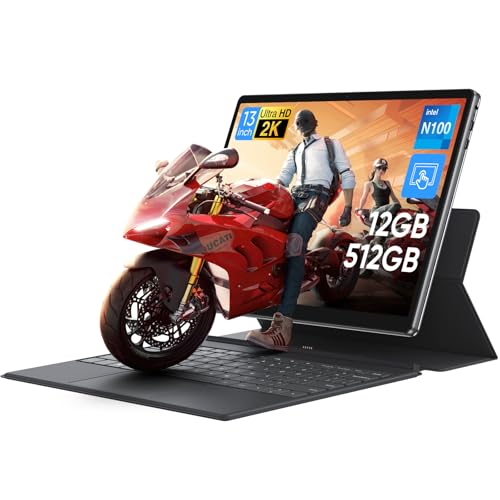
Best for those who want a convertible device with tablet-like versatility. The MARGOLAI 13″ 2-in-1 offers a 2K IPS touchscreen, 12GB RAM, and a 512GB NVMe SSD. Its 3:2 aspect ratio is great for document work and browsing, while the 2-in-1 form factor adapts to note-taking and media viewing. This is a strong pick for students and professionals who value flexibility in how they use their device.
Choose this if you want occasional tablet mode and a strong display for productivity and media consumption. Caution: The N100 processor is energy-efficient but may lag with heavier workloads compared to higher-tier CPUs.
Lenovo ThinkPad X1 Nano Gen1
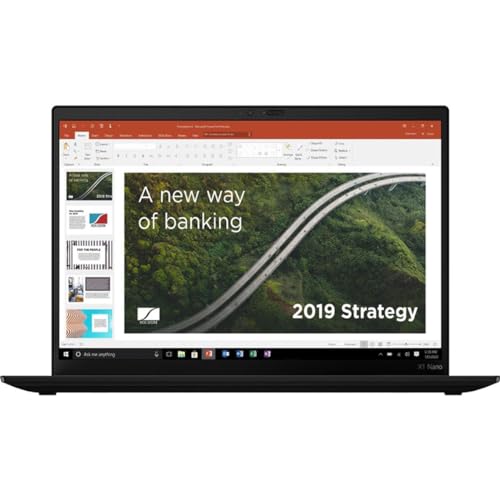
Best for ultra-portable professionals who value weight and efficiency. The ThinkPad X1 Nano Gen1 features a 13″ chassis with a Core i7 processor, 16GB RAM, and 512GB SSD. It emphasizes portability with a light build while delivering robust performance for productivity, coding, and content creation. The device also includes security features typical of ThinkPad lines, making it suitable for travel and work on the go.
Better for: travelers and students who need a featherweight laptop without compromising on performance. Limitation: Some configurations may have display or battery trade-offs compared to larger ThinkPad models.
Apple MacBook Air (13″, Renewed)

Best for long battery life and a polished ecosystem. The renewed 13″ MacBook Air combines a retina display, a refined keyboard, and Apple’s energy-efficient architecture. It is well-suited for writers, students, and professionals invested in macOS software, productivity tools, and media editing within a compact form factor. It excels in portability and efficiency, with strong support for everyday tasks and creative workflows.
Choose this if you prefer macOS, a high-quality display, and extended battery use. Limitation: Renewed units may vary in condition; verify battery health and return policy before purchasing.
Buying Guide
What screen size and resolution should you prioritize?
For a true 13-inch ultrabook experience, look for bright, high-contrast displays with at least Full HD (1920×1080) or higher resolution. A 2K or 2.8K panel improves clarity for text and visuals, especially on long reading or writing tasks. A 3:2 aspect ratio is helpful for productivity, while 16:9 works well for media viewing.
How important is processor and RAM for multitasking?
For everyday work, a current-generation Core i5 or i7 with 8GB RAM is a baseline. 12GB or 16GB RAM is preferable for heavy multitasking, large documents, or editing tasks. Storage matters too; 512GB or 1TB SSD speeds up boot, file access, and app launches.
Which form factor is best for me: clamshell or 2-in-1?
If you frequently take notes by hand or present in tablet mode, a 2-in-1 with a responsive touchscreen can boost productivity. If you mainly type for long sessions, a traditional clamshell with a comfortable keyboard might be better for long work hours.
What about battery life and reliability?
Ultrabooks excel when they combine efficient processors with well-optimized firmware. Battery life varies by workload; expect better endurance with light tasks such as web browsing and document editing. Enterprise-grade models often emphasize reliability and service options, which can be crucial for business users.
What should I check before buying renewed or refurbished?
Inspect battery health, screen condition, and overall wear. Confirm return policies and warranty terms. Renewed units can offer substantial savings but may carry greater risk of minor issues compared with new devices.
Durability and ports: what to expect?
Look for sturdy chassis materials, spill-resistant keyboards, and a practical selection of ports (USB-C, USB-A, HDMI). Some slim ultrabooks omit certain ports; plan adapters if needed for your workflow.
FAQ
- Q: Is a 13″ ultrabook enough for heavy photo or video editing?
A: It can handle light to moderate editing, but for heavy workflows, a higher-power laptop with more cooling and GPU capability may be preferable. - Q: Are 2-in-1 laptops suitable for frequent typing?
A: Yes, but some users prefer dedicated keyboards for longer typing sessions; test the keyboard feel if possible. - Q: Do renewed devices come with a warranty?
A: Warranties vary by seller; check the listing for warranty length and what it covers before buying renewed. - Q: Which brand offers the best keyboard on 13″ ultrabooks?
A: Several brands, including ThinkPad and Dell XPS-style lines, emphasize comfortable, reliable keyboards. Personal preference matters the most. - Q: Is battery life better on Intel or Apple silicon in 13″ ultrabooks?
A: Apple Silicon models often deliver strong battery life efficiency; Intel-based ultrabooks vary by design and generation. - Q: Can I upgrade storage or RAM on these models?
A: Many ultrabooks have soldered RAM or non-upgradable storage; check the specific model’s upgrade options before purchase.
The selections above provide a mix of portability, performance, and form factors to suit different buyer intents. Whether you need a traditional clamshell for serious work, a 2-in-1 for flexible use, or a macOS option for those deeply integrated into Apple software, these 13-inch ultrabooks offer practical choices for modern on-the-go computing.