Answering buyers seeking affordable all‑in‑one PCs, this guide compares five budget-friendly options that pair a compact footprint with solid performance. Best for students, home offices, or budget-conscious professionals who want a clean desk and straightforward setup. Each pick balances value, essential features, and practical limits to help you choose confidently.
| Product | Display / CPU | RAM / Storage | OS | Best For |
|---|---|---|---|---|
| Cybrimax 24″ All‑in‑One | 24″ display, i5 up to 3.3 GHz | 16 GB / 256 GB SSD | Windows 11 Home | Power users needing multitasking |
| MECHAZER 19″ All‑in‑One | 19″ display, up to 3.7 GHz | 8 GB / 256 GB SSD | Windows | Small desk setups |
| SAINTDISE 19″ All‑in‑One | 19″ 1080p display | 8 GB / 256 GB SSD | Windows | Home office and learning |
| STGSivir 21.5″ All‑in‑One | 21.5″ FHD, Core i5 | 16 GB / 512 GB SSD | Windows | Media, study, light editing |
| BlairTech ChromeOS Flex All‑in‑One | 24″ monitor, ChromeOS Flex | 8 GB / 128 GB SSD | ChromeOS Flex | Schoolwork & cloud tasks |
Cybrimax 24″ All‑In‑One Desktop

This entry targets buyers who want robust multitasking without a separate tower. The Cybrimax system pairs an i5 processor with 16 GB RAM and a 256 GB SSD, delivering responsive web browsing, document work, and moderate creative tasks. The 24″ panel supports sharp visuals for data-heavy spreadsheets and design previews. The built‑in privacy webcam is a plus for remote meetings.
Best for: professionals, students, or home office users who want strong multitasking in a single unit and plan to run multiple apps side by side. Caution: 256 GB SSD may fill quickly with large media libraries; consider external storage for heavy files.
MECHAZER All‑in‑One Desktop, 19 Inch

The MECHAZER model emphasizes space saving with a compact 19″ chassis while delivering reliable everyday performance. It uses an i5 processor with 8 GB RAM and 256 GB SSD, suitable for web tasks, video calls, and office software. Its slim footprint is ideal for small desks or shared spaces.
Best for: users who want a minimal desk footprint and straightforward usage. Choose this if you rarely need heavy multitasking. Limitation: 8 GB RAM can bottleneck with many browser tabs or heavy editing tasks; consider models with 16 GB if multitasking is frequent.
SAINTDISE 19″ All‑in‑One
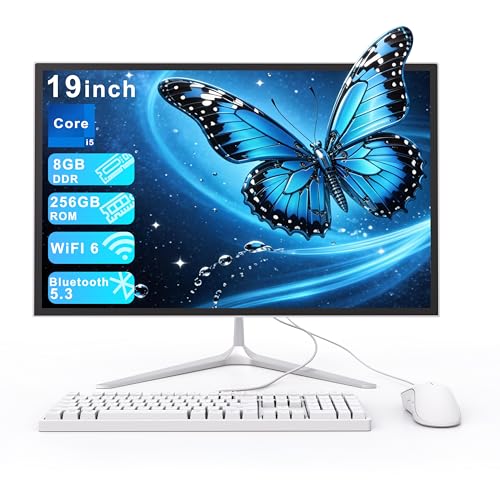
This unit combines a practical 19″ display with an 8 GB RAM and 256 GB SSD configuration, driven by a Core i5-style setup. It suits everyday tasks, light streaming, and home office use while saving desk space. WiFi 6 and Bluetooth 5.3 enable efficient wireless peripherals for a clean workspace.
Best for: home office workers and students who value a compact design and reliable performance. Limitation: 19″ display is smaller for long design or data analysis sessions; consider larger displays if visual fidelity matters.
STGSivir All‑in‑One PC, 21.5″

The STGSivir option prioritizes a larger 21.5″ Full HD screen and a 16 GB RAM/512 GB SSD combo, plus an Intel Core i5 configuration. It supports multitasking, light photo or video editing, and streaming with ample local storage for projects. The integrated webcam adds convenience for remote work and learning.
Best for: users who want more screen real estate and better multitasking capacity than smaller all‑in‑ones. Better for: multimedia tasks and project work that benefit from faster storage. Caution: 512 GB SSD may still fill quickly with large media libraries; plan cloud or external storage if needed.
BlairTech ChromeOS Flex 24″ All‑in‑One

This model runs ChromeOS Flex, not Windows, offering a streamlined, cloud-centric experience. With an 8 GB RAM and 128 GB SSD, it handles web-based tasks, streaming, and schoolwork efficiently. The 24″ monitor plus RGB speakers create an engaging learning or classroom setup.
Best for: students or families who rely on cloud apps and web services. Choose this if you value simplicity and frequent updates from cloud-based tools. Limitation: ChromeOS Flex does not run traditional Windows programs; consider needs for any Windows-only software before choosing.
Buying Guide
What should I look for in a budget all‑in‑one computer?
Key factors include CPU performance, RAM, storage, display size, and upgrade paths. For everyday tasks, aim for at least a quad-core processor, 8–16 GB RAM, and 256 GB SSD. If you plan to multitask or edit media, prioritize 16 GB RAM and 512 GB SSD where possible.
Windows vs ChromeOS Flex: how to choose?
Windows offers broad software compatibility and desktop apps. ChromeOS Flex provides fast, cloud-centric use with strong security and easy updates. Choose Windows for compatibility with specialized programs; choose ChromeOS Flex for schoolwork, browsing, and light productivity.
What about display and ergonomics?
24″ is comfortable for most tasks; 19″ or 21.5″ models save space but may require more scrolling and resizing. Look for full HD (1080p) or better; consider adjustable stands or tilt features for comfortable viewing during long sessions.
Storage considerations
256 GB SSD is common in budget AIOs and offers fast boot and app loading. If you store large files locally, plan for external hard drives or cloud storage. Check for expandability options like USB-C or extra bays if you anticipate growth.
Wireless connectivity and peripherals
WiFi 6 and Bluetooth 5.3 are standard on many new AIOs and improve wireless performance. Verify keyboard and mouse compatibility and whether bundled peripherals match your needs for a ready-to-use setup.
Which model is best for my use case?
- Best for multitasking and professional work: Cybrimax 24″ All‑In‑One, STGSivir 21.5″ All‑In‑One.
- Best for compact spaces: MECHAZER 19″ All‑In‑One, SAINTDISE 19″ All‑In‑One.
- Best for cloud-based tasks and classrooms: BlairTech ChromeOS Flex All‑In‑One.
FAQ
- Are all-in-one PCs suitable for heavy editing tasks?
Budget all-in-one systems can handle light to moderate editing. For intensive video or photo editing, look for models with 16 GB RAM or more and larger SSDs, and consider external storage for media files.
- Do all-in-ones offer upgradeable components?
Most budget all-in-ones have limited internal upgradeability, typically focusing on RAM or storage. Always check specific model specs to confirm what can be upgraded.
- Is ChromeOS Flex a good replacement for Windows on an AIO?
For web-based tasks, light productivity, and education, ChromeOS Flex can be a solid choice. If you need Windows-only software, choose a Windows-based model.
- What display size should I choose for a home office?
24″ is a comfortable standard for desk work, while 19″ and 21.5″ models save space but may require more scrolling. Consider desk size and comfort preferences.
- Should I prioritize more RAM or more storage?
RAM affects multitasking speed; storage affects file availability. If budget allows, prioritize 16 GB RAM and 512 GB SSD for smoother multitasking and faster file access.